Cost of a hot-air combo station versus iron-only
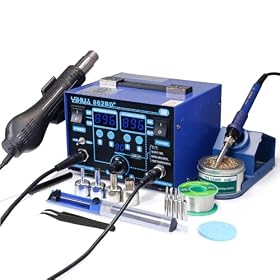
A hot-air combo station usually costs more upfront than an iron-only soldering station because it combines two tools: a temperature-controlled soldering iron and a hot-air rework system. The extra expense can be worthwhile if you regularly work with surface-mount components, shrink tubing, connectors, or boards that require reflow. For occasional through-hole soldering and basic electronics repairs, an iron-only station is often the more economical choice.
What you are paying for
An iron-only station generally includes a temperature-controlled iron, a stand, and one or more replaceable tips. Depending on the design, it may also include features such as adjustable temperature, sleep mode, calibration controls, or preset temperatures.
A hot-air combo station adds a separate hot-air circuit and typically includes:
- A hot-air handpiece
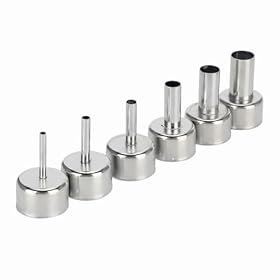
- Nozzles in different sizes or shapes
- An air pump or fan
- Airflow controls
- A holder for the hot-air handpiece
- Additional heating and control electronics
The combo unit is not simply an iron with an inexpensive accessory. The hot-air section needs to regulate both heat and airflow, and its handpiece and nozzles must be stored safely while hot. Those additional components account for much of the price difference.
Total cost matters more than the purchase price
Compare the complete setup rather than the advertised base price. An iron-only station may need a few additions, while a combo station may include accessories you would otherwise have to buy separately.
Typical extra costs to consider
For an iron-only setup, budget for items such as:
- Replacement tips for different joint sizes
- Solder and flux
- Brass wool or a damp sponge for tip cleaning
- A soldering mat or heat-resistant work surface
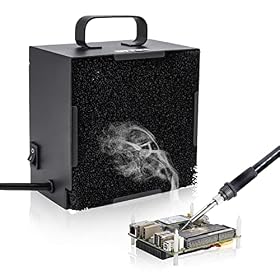
- Fume extraction or local ventilation
- Helping hands or a PCB holder
For a hot-air setup, you may also need:
- Replacement hot-air nozzles
- Heat-resistant tweezers
- Kapton or other heat-resistant tape
- Board preheating equipment for difficult jobs
- More capable fume extraction
- A shield or masking material to protect nearby components
A combo station can reduce the need to buy a second complete tool later, but only if you will actually use the hot-air function. Buying unused capability is still an added cost.
When an iron-only station is the better value
Choose an iron-only station when your work mainly involves:
- Through-hole components
- Wires and terminals
- Basic connector repairs
- Occasional single-joint repairs
- Large solder joints that do not require reflow
- Learning electronics soldering
An iron-only station also takes up less bench space and is usually simpler to set up. There are fewer controls to adjust and fewer consumable parts to maintain. For many hobby benches, a good iron with suitable tips is more useful than an inexpensive combo station with a hot-air section that rarely leaves its holder.
If you need hot air only once or twice a year, borrowing a suitable tool or using a separate entry-level hot-air tool may cost less than purchasing a combo station. Make sure any borrowed or inexpensive tool is appropriate for the board and component work involved.
When the combo station can justify its cost
The added cost is easier to justify if you regularly perform tasks that an iron cannot handle efficiently, including:
- Removing or installing surface-mount integrated circuits
- Reworking multi-pin packages
- Reflowing solder paste on small boards
- Removing adhesive-backed components
- Shrinking heat-shrink tubing without direct contact
- Heating connectors or components with many joints at once
- Softening conformal coatings or compatible adhesives
Hot air distributes heat across an area rather than transferring it through a single metal tip. That makes it useful for multi-pin parts, but it also increases the risk of moving nearby components or overheating the board. A combo station is not automatically easier or safer; it gives you another method that requires controlled temperature, airflow, distance, and dwell time.
Compare the hot-air section carefully
Two combo stations can have very different practical value even if both include an iron and hot-air handpiece. Check the specifications and included accessories that affect actual use.
Temperature control
Look for stable, adjustable temperature control and clear instructions for calibration or temperature verification. The displayed temperature is not necessarily the exact temperature at the component, especially when the handpiece is held at different distances or airflow settings.
Airflow adjustment
Adjustable airflow is important. Excessive airflow can move small components, disturb solder paste, or heat nearby parts unnecessarily. Low, controlled airflow is often useful for precision rework, while higher airflow may help with larger areas.
Nozzle availability
Confirm that replacement nozzles are available and that the included sizes match your work. A nozzle that is too large can heat neighboring components, while one that is too small may heat unevenly or require excessive dwell time.
Handpiece storage and cooldown
A stable holder and a practical cooldown arrangement matter for safety and bench organization. The handpiece and nozzle remain hot after use, so the station should provide a secure place to set it down.
Iron compatibility
Check whether replacement tips are easy to find and whether the iron uses a tip family suited to your work. Tip availability can affect long-term ownership cost more than a small difference in the initial station price.
A simple cost comparison method
Use this calculation before buying:
- Price the iron-only station that has the control and tip system you want.
- Add the cost of essential tips, soldering accessories, and ventilation.
- Price a combo station with a comparable iron section.
- Add any missing hot-air nozzles, tweezers, shielding materials, and extraction equipment.
- Subtract the cost of tools you would otherwise need to buy separately.
- Consider how often you expect to use hot air over the life of the station.
The combo station offers better value when its added cost is lower than the cost of buying a comparable hot-air tool later, or when having both functions available saves enough time and repeated setup work to matter.
Do not compare a high-quality iron-only station with a poorly equipped combo station solely by the number of functions. The iron is still the tool you will use most often for many electronics jobs. A weak iron section, limited tip selection, unstable temperature control, or poor replacement-part availability can make a combo station a poor bargain.
Ownership and maintenance costs
Both types of stations need replacement tips and normal cleaning. Combo stations have additional parts that may eventually need attention, including hot-air nozzles, handpiece components, air filters where fitted, and the fan or pump system.
Keep costs down by:
- Using the lowest effective temperature and airflow
- Cleaning tips correctly instead of filing or sanding them
- Keeping solder and flux residue away from controls and connectors
- Allowing the hot-air handpiece to cool as directed
- Replacing damaged tips and nozzles rather than forcing them into holders
- Following the manufacturer’s maintenance and storage instructions
If replacement handpieces, nozzles, or tips are difficult to source, a cheaper station can become expensive to keep usable. Check parts availability before purchase, especially for a combo model from a lesser-known manufacturer.
Bottom line
An iron-only station is usually the lower-cost and lower-complexity choice for general soldering, wires, through-hole parts, and occasional repairs. A hot-air combo station costs more, but the premium can make sense when surface-mount rework, solder-paste work, or heat-shrink tasks are a regular part of your bench work.
Choose based on the work you actually do, not simply on the number of functions included. If you are uncertain, spend more on a dependable iron and tips first; add hot air when your projects consistently require it. For either setup, use proper ventilation, protect heat-sensitive components, and follow the manufacturer’s electrical and operating instructions.