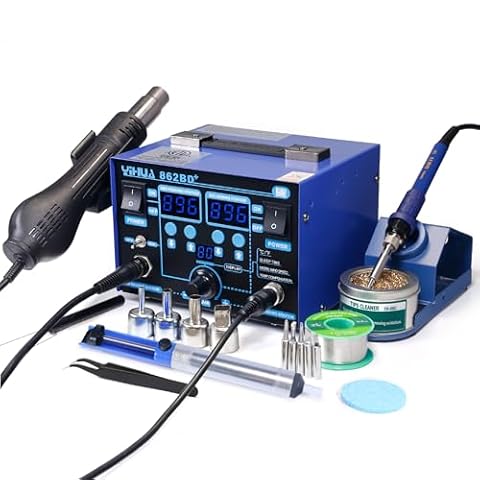
SolderingPractical help choosing, using and maintaining soldering irons and stations for electronics work.

Soldering

Practical help choosing, using and maintaining soldering irons and stations for electronics work.

Best For Job

  • Best soldering station for electronics hobbyists

    The best soldering station for an electronics hobbyist is usually a temperature-controlled, grounded station with readily available tips, a comfortable iron, and enough power for the work you actually do.

  • Best Soldering Station for Fine-Pitch Work

    The best soldering station for fine-pitch work gives you stable temperature control, compatible small tips, fast thermal recovery, and a comfortable handpiece. Here is what matters most when comparing stations for SMD and other delicate electronics.

  • Best station if you already have compatible tips

    If you already own a useful set of soldering tips, the best station is usually the one built for that exact tip family—not simply the station with the highest wattage. Check the heater design, handle connection, tip series, temperature control, and replacement-part availability before buying.

  • Best soldering iron for beginners

    The best soldering iron for a beginner is usually a temperature-controlled iron or compact station with interchangeable tips, stable heat, comfortable handling, and readily available replacement parts.

Choosing

Consumables

  • Best flux for oxidized wires on a repair

    For oxidized wires, choose electronics-grade rosin or no-clean flux—not plumbing acid flux. Clean and abrade the wire first, then apply a small amount of flux and tin the conductor before making the repair.

  • Best solder for electronics kits

    For most electronics kits, a thin rosin-core solder is the easiest choice. Learn when to choose 63/37 leaded solder, lead-free solder, different diameters, and no-clean or water-soluble flux.

  • Buying 63/37 for Learning Then Switching to Lead-Free

    63/37 solder is forgiving for learning electronics, but switching to lead-free later requires different technique, temperature settings, and sometimes different flux. Here is how to buy both without wasting material.

  • Desoldering pump that actually holds vacuum

    A desoldering pump loses its usefulness when air leaks past the plunger or nozzle. Here’s how to choose one with a reliable seal and how to fix common vacuum problems.

  • Lead-free solder and flux pen kit

    A practical guide to choosing a lead-free solder and flux pen kit for circuit boards, wire repairs, and general electronics work.

Price & Buying

  • Best beginner kit that includes stand and solder

    The best beginner soldering kit should include more than an iron and a coil of solder. Look for adjustable temperature control, a stable stand, suitable electronics solder, replaceable tips, and basic safety accessories.

  • Temperature-controlled station for through-hole kits

    A temperature-controlled soldering station makes through-hole kits easier to assemble by maintaining a more consistent tip temperature. Here is how to choose the right station without paying for features you may not need.

Troubleshooting

  • Desoldering braid not wicking

    If desoldering braid is not absorbing solder, the usual causes are oxidized braid, insufficient flux, poor heat transfer, or the wrong braid width. Work through these checks before replacing your soldering iron.

  • Flux smoke filling a small room

    If flux smoke is filling a small room, stop soldering, ventilate the space, and move the extraction nozzle close to the solder joint. Then check the filter, airflow path, seals, and setup before assuming the extractor motor has failed.

  • Solder will not melt on the iron

    If solder will not melt on your iron, the usual causes are an oxidized or poorly tinned tip, insufficient temperature, poor contact, unsuitable solder, or a failing heating element. Work through these checks in order before replacing the iron.

  • Soldering Iron Not Heating Up: Causes and Fixes

    If your soldering iron is not heating up, start with the tip, power connection, temperature setting, and heater indicator. These checks can identify a worn consumable or a failed iron without opening the tool.

  • Station temperature jumping around: causes and fixes

    A soldering station may show small temperature changes during normal heating, but rapid, large, or persistent jumps can indicate a loose tip, poor contact, damaged handpiece cable, incorrect setup, or a failing sensor or heater.

  • Tip dying because it was left dry at 400C

    Leaving a soldering tip dry at 400°C can burn away its protective solder coating and create heavy oxidation. Try cleaning and re-tinning it while hot, but replace the tip if solder still beads up or will not wet the working surface.

  • Tip not staying tinned: causes and fixes

    A soldering tip that will not stay tinned is usually oxidized, contaminated, overheated, or worn out. Follow these checks in order before replacing the tip or station.

  • Tip Oxidizing After a Few Sessions: Causes and Fixes

    A soldering tip that turns dark, stops wetting, or develops a rough surface after a few sessions is usually being overheated, cleaned too aggressively, or left un-tinned. Check the tip, solder, flux, temperature, and storage before assuming the iron itself has failed.

  • USB-C PD Irons and Underpowered Chargers

    A USB-C soldering iron that heats slowly, cycles on and off, or cannot maintain temperature may be receiving too little power. Check the charger’s USB Power Delivery profile, cable, and the iron’s requirements before replacing the iron.

Setup

  • Best Fume Extractor for a Small Bench: What to Look For

    For a small soldering bench, the best fume extractor is usually a compact source-capture unit with an adjustable arm, replaceable activated-carbon filtration, and enough airflow to pull smoke away without dominating the workspace.

  • Best fume extractor if windows cannot open

    When you cannot open a window, choose a soldering fume extractor that captures smoke at the iron rather than simply cleaning the room. Here is how to compare filter types, airflow, arm placement, noise, and replacement-filter costs.

  • Buying a silicone mat before the first kit

    A silicone mat is a useful first purchase for electronics work, but the right one depends on your workspace, project size, and safety needs. Here is what to check before buying.

  • Carbon filter life in a small fume extractor

    A small soldering fume extractor’s carbon filter does not have one universal service life. Usage, flux type, airflow, and filter size all matter. Learn when to replace it and what carbon filtration can—and cannot—remove.

  • Compact Fume Extractor for a Desk: What to Look For

    A compact fume extractor can reduce soldering smoke at a desk, but the right choice depends on filter design, airflow, arm reach, noise, and how close the intake can sit to the work area.

  • Fume extractor for a kitchen-table bench

    A kitchen-table soldering setup needs a compact extractor that captures smoke near the joint without taking over the workspace. Here is how to choose one and use it safely.

  • Helping hands versus a PCB vise

    Helping hands are flexible and inexpensive, while a PCB vise usually provides steadier, more repeatable support. Choose based on board size, access, soldering precision, and how often you reposition your work.

  • Helping-hands stand with a magnifier

    A helping-hands stand with a magnifier can hold small parts steady while you solder, but stability and adjustability matter more than a long feature list. Here’s what to look for before buying.

  • PCB holder with rotating jaws

    A PCB holder with rotating jaws can make soldering, inspection, and rework easier by keeping the board secure while allowing access to both sides. Here are the specifications that matter before you buy.

  • Solder smoke without an extractor in winter

    You can reduce solder smoke in winter without a dedicated extractor by controlling the flux, positioning a fan to move fumes away from your breathing zone, and ventilating without creating an unsafe draft. These measures are temporary substitutes—not a complete replacement for source capture.

Use Cases

  • Best iron for repairing earbuds and tiny wires

    The best iron for repairing earbuds and tiny wires is usually a temperature-controlled station or compact precision iron with interchangeable fine tips. Prioritize control, tip quality, heat recovery, and a comfortable handle over maximum wattage.

  • Best portable soldering iron for field repairs

    The best portable soldering iron for field repairs depends on how much power, runtime, temperature control, and flexibility you need away from a workbench. This guide compares the main portable designs and explains what to check before buying.

  • Best station for repairing game consoles

    The best soldering station for game console repair should provide stable temperature control, interchangeable fine tips, enough power for ground planes, and a comfortable handpiece. Here is how to choose one for HDMI ports, USB connectors, capacitors, and board-level repairs.

Wattage & Tips

  • Buying extra chisel and conical tips together

    Buying chisel and conical tips together can cover most electronics work, but only if the tips fit your soldering iron and match the jobs you do. Here is what to check before ordering.

  • Chisel-tip iron for thicker wires

    A chisel tip transfers heat more effectively than a fine conical tip when soldering thicker wires. Here is how to choose the right iron, tip size, wattage, and temperature control without overheating the joint or insulation.

  • Conical versus chisel tip: Which soldering tip should you use?

    Conical tips offer precision for small joints, while chisel tips transfer heat more efficiently across larger pads and leads. The right choice depends on the joint, not just the component size.

  • Replacement tips for a common station

    The right replacement soldering tip must match your station’s tip family and heating design. Use the compatibility checks below before choosing a size or shape.