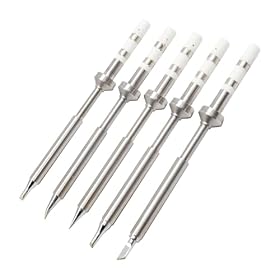
A pencil iron is usually the simpler, more portable option, while a soldering station separates the heated handpiece from a powered control base. For occasional wire repairs or basic electronics, a quality pencil iron may be enough. For frequent circuit-board work, delicate components, or repeatable results, a soldering station is usually the better choice.
What is a pencil soldering iron?
A pencil iron is a handheld soldering tool shaped roughly like a pen or pencil. It may plug directly into an outlet, USB power source, or a separate power supply. Some models have fixed heat, while others include basic temperature adjustment or electronic regulation.
The main advantages are simplicity and portability. There is no separate control box taking up bench space, and setup is usually quick. A pencil iron can be a practical choice for:
- Occasional wire splicing and connector repairs
- Simple through-hole circuit-board work
- Field repairs where portability matters
- Beginners who want a low-complexity tool
- Small jobs where precise temperature adjustment is not essential
The main limitation is that features vary widely. A basic pencil iron may have slower heat recovery, less accurate temperature control, fewer compatible tips, or a less comfortable grip than a station handpiece.
What is a soldering station?
A soldering station includes a handpiece, a powered base, and controls for setting or regulating the working temperature. Depending on the design, the base may also provide a stand, tip-cleaning area, sleep settings, calibration controls, or other management features.
A station is useful when you need consistent heat and better control over different soldering jobs. It is often the better fit for:
- Regular electronics repair or assembly
- Small surface-mount components
- Boards with heat-sensitive parts
- Lead-free soldering, which can require more heat management
- Frequent tip changes
- Work that demands repeatable results
A station still depends on the handpiece and tip. The control base cannot compensate for a damaged tip, poor thermal contact, unsuitable solder, or incorrect technique.
Pencil iron versus station: the important differences
Temperature control
This is the largest practical difference, although the product categories overlap. Some pencil irons have regulated or adjustable temperature, and some stations offer only basic controls. Check the actual specifications rather than relying on the product label.
A station generally makes it easier to set a target temperature and maintain it as the tip transfers heat into a joint. This matters when working with small pads, heat-sensitive components, different solder types, or repeated joints.
Fixed-temperature irons can work well for straightforward jobs, but they provide less flexibility. If the iron runs too hot, it can damage pads, insulation, or components. If it runs too cool, solder may melt slowly and produce weak or poorly formed joints.
Heat recovery and power delivery
Power rating alone does not tell you how well an iron performs. Heat recovery depends on the heater, sensor, control system, tip design, and how efficiently heat reaches the joint.
A station often has better-regulated power delivery and can recover more predictably after contact with a larger joint or ground plane. This is useful when soldering connectors, shielded areas, thick wires, or boards that draw heat away from the pad.
A pencil iron can still handle many of these tasks, but a basic model may cool noticeably when the tip contacts a large thermal mass.
Tip selection and availability
Tips are consumables. Their shape, size, plating, and compatibility affect how easily you can heat a joint and control solder flow.
Before buying either tool, check:
- Which tip family it accepts
- Whether replacement tips are readily available
- Whether the available shapes suit your work
- How tips are installed and removed
- Whether the manufacturer specifies compatible temperatures
A station with a broad selection of compatible tips can be more adaptable, but a proprietary or difficult-to-find tip system can increase long-term inconvenience. A pencil iron may be perfectly adequate if its replacement tips are available and match your projects.
Ergonomics and workspace
A pencil iron usually takes up less space and may be easier to carry. However, comfort depends on the handle diameter, grip material, balance, cord flexibility, and distance between the grip and hot tip.
A station handpiece may offer a more refined grip and a more flexible lead. The separate base also gives you a dedicated place to park the hot tool. This can make longer sessions less tiring and reduce the chance of leaving the iron on the work surface.
Regardless of tool type, use a stable stand and keep the hot tip away from cords, plastic, paper, and other flammable materials.
Controls and convenience features
A station may include features such as:
- Adjustable temperature
- Digital or clearly marked controls
- Automatic sleep or standby modes
- Tip temperature calibration
- Replaceable handpieces
- Integrated stands or cleaning accessories
These features are useful, but they should not replace checking the basics: temperature regulation, tip compatibility, heater availability, cord quality, and manufacturer support.
A simple pencil iron has fewer controls to learn and fewer parts to manage. That simplicity can be an advantage for occasional users.
Portability and power source
Pencil irons are generally easier to transport. Some compact models are designed for low-voltage supplies or USB power, but the available heating performance depends on the power source and the tool's design. Do not assume that a USB-powered iron will perform like a full-size bench tool.
A station is less convenient for field work because the base and handpiece must be carried together. It is usually better suited to a fixed workbench.
Cost over time
The purchase price is only part of the cost. Consider replacement tips, cleaning materials, a stand, compatible handpieces, and the availability of replacement parts.
A low-cost pencil iron may be economical for occasional work. A station can offer better long-term value if it improves consistency, reduces rework, and supports the tip shapes and replacement parts you need.
Which tool should you choose?
Choose a pencil iron if:
- You solder only occasionally
- Your work is mostly wires, connectors, or simple through-hole joints
- You need a compact tool for repairs away from a bench
- You want the simplest setup
- You can accept less control or fewer convenience features
Look for a regulated model if temperature consistency matters. Also verify that it includes or supports tips appropriate for the size of your joints.
Choose a soldering station if:
- You solder regularly
- You work on circuit boards with mixed component sizes
- You need repeatable temperature control
- You use different solder types or tip shapes
- You work with surface-mount parts or heat-sensitive components
- You want better ergonomics and bench organization
A station is particularly worthwhile when the cost of damaged boards, lifted pads, or repeated rework is higher than the cost of a more capable tool.
What specifications matter most?
When comparing tools, prioritize these specifications in order of practical importance:
- Temperature regulation: Look for a tool that maintains heat under normal load, not merely one with a high maximum temperature.
- Tip compatibility: Confirm that the available tip shapes fit your work and can be replaced easily.
- Heat-up and recovery behavior: Manufacturer documentation may describe these characteristics, but power rating alone is not enough.
- Handpiece ergonomics: Check the grip, cord, balance, and distance from the handle to the tip.
- Controls and safety features: A stable stand, insulation, grounding information, and automatic standby can improve safe use.
- Parts and support: Replacement tips, heaters, handpieces, and documentation affect the tool's useful life.
For electronics work, a temperature range that covers your solder and components is more useful than choosing a tool based only on its highest advertised temperature. Follow the solder and component manufacturer's guidance, and avoid using more heat than necessary.
Tips for getting better results with either tool
- Match the tip size to the joint: large enough to transfer heat, but not so large that it contacts neighboring pads.
- Keep the tip clean and lightly tinned when the tool is hot.
- Heat the pad and lead together before feeding solder into the joint.
- Do not use excessive force to transfer heat.
- Use appropriate flux when the joint is oxidized or difficult to wet.
- Return the tool to its stand between joints.
- Unplug the iron or turn off the station when finished, then allow it to cool safely.
If solder will not melt smoothly, first check the tip condition, temperature setting, solder type, and whether the tip is actually contacting both surfaces. A bigger iron is not always the answer; poor heat transfer or oxidation is often the real problem.
Bottom line
A pencil iron is the better choice for simple, occasional, or portable soldering. A soldering station is the stronger choice for frequent electronics work because it typically provides better control, ergonomics, and adaptability. If you are unsure, choose based on your work rather than the tool's maximum temperature or power rating: basic wire repairs favor simplicity, while varied circuit-board work favors a regulated station.