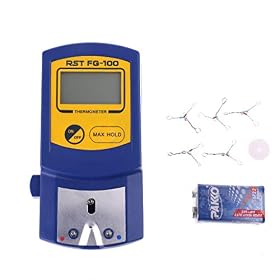
A soldering station can display an exact-looking temperature while the soldering tip is significantly hotter or cooler at the workpiece. The overlooked question is not just whether a station reaches its set temperature, but how closely the working tip holds that temperature under load.
For electronics work, temperature accuracy affects solder flow, flux activity, component stress, and the risk of damaging pads or insulation. Look beyond the number on the display and evaluate regulation, calibration, tip compatibility, thermal recovery, and the way temperature is measured.
Display temperature is not tip temperature
The temperature shown by a station is usually based on a sensor inside the handpiece or heating assembly. That sensor may not be located at the very end of the tip, where heat is transferred into a joint.
Several factors can create a difference between the display and the working surface:
- Sensor location: A sensor close to the heater may react differently from one near the tip.
- Tip construction: Different tip designs transfer heat from the heater to the working surface in different ways.
- Tip size and shape: A small conical tip can lose heat more quickly than a larger chisel tip during soldering.
- Oxidation and contamination: A dirty or oxidized tip transfers heat poorly.
- Contact with the joint: A large ground plane or thick wire can draw heat away quickly.
- Air movement and workspace conditions: Drafts and nearby cooling can affect exposed tip surfaces.
A station that reads 350°C is therefore not automatically delivering 350°C at every joint. The setpoint is useful for repeatability, but it is not a complete measurement of soldering performance.
What temperature regulation actually tells you
Temperature regulation is the station’s ability to detect heat loss and restore the tip to its target temperature. Good regulation matters more than simply reaching a high maximum temperature.
A station may reach its setpoint quickly but struggle when the tip contacts a large connector, a ground plane, or a chassis-mounted component. During that contact, the tip temperature falls. The important questions are:
- How far does the temperature drop under load?
- How quickly does the heater respond?
- Does the station avoid large overshoots after the load is removed?
- Does the handpiece maintain consistent heat with different compatible tips?
Manufacturers may describe this behavior using terms such as temperature stability, regulation, recovery time, or closed-loop control. These terms are not always measured under the same conditions, so specifications from different brands may not be directly comparable.
For routine through-hole and general electronics work, stable heat delivery and suitable tip selection can matter more than an exceptionally high maximum temperature. For fine-pitch work, the ability to avoid overshoot and maintain a controlled tip temperature becomes especially important.
Tip temperature accuracy depends on the tip
A station’s temperature specification may apply only to particular tips, handpieces, or operating conditions. Switching from one tip family to another can change heat transfer and the temperature at the working surface.
Before buying replacement tips, verify:
- The tip is designed for the exact handpiece or station.
- The tip’s dimensions and heater arrangement are compatible.
- The tip shape suits the joint size and soldering task.
- The manufacturer provides any relevant calibration or temperature guidance.
Tip shape affects both thermal behavior and usability. A fine tip is useful for access and small pads, but it has less thermal mass and less contact area. A chisel or hoof tip can transfer heat more effectively to larger joints, provided it fits the work and does not obstruct nearby components.
Do not compensate for a poor tip match simply by increasing the station temperature. That can increase oxidation, flux burn-off, and the chance of lifting pads or overheating components without solving the underlying heat-transfer problem.
Calibration is the detail many comparisons omit
A station may be accurate when new but require calibration after tip changes, handpiece replacement, heavy use, or service. Calibration is particularly relevant when you need repeatable work across multiple operators or when working with temperature-sensitive components.
The calibration method varies. Some stations provide a user adjustment procedure, while others require a specified measurement accessory or service process. Follow the manufacturer’s instructions rather than applying a generic correction.
When comparing stations, look for clear information about:
- Whether calibration is supported
- What measuring equipment is required
- Whether calibration applies to the station, handpiece, or individual tip
- Whether settings are retained after power loss
- Whether the stated accuracy applies across the full temperature range
A display with fine one-degree increments does not prove one-degree accuracy. Resolution describes how the number is shown; accuracy describes how closely it matches the actual temperature; stability describes how much it changes over time or under load. These are different specifications.
How temperature claims should be interpreted
Temperature claims are most useful when they include test conditions. A statement about accuracy without a specified tip, ambient condition, measurement point, or load is difficult to use for comparison.
Pay attention to the difference between:
- Setpoint range: The temperatures the control can be configured to target.
- Display resolution: The smallest increment shown on the screen.
- Temperature accuracy: The difference between the indicated or controlled temperature and a reference measurement.
- Stability: How consistently the temperature is maintained.
- Recovery time: How quickly heat returns after the tip loses temperature.
- Heating time: How quickly the station reaches its initial target.
Heating time is often emphasized because it is easy to demonstrate. Recovery and stability are more relevant once you are actually soldering. A station that heats quickly but recovers poorly may feel less capable on large joints than a slower station with stronger heat delivery.
A practical way to compare stations
Use this checklist when reading specifications, manuals, and detailed user documentation:
1. Check the control system
Look for a closed-loop temperature-control system with a clear explanation of how the handpiece senses and regulates heat. Avoid assuming that a digital display alone indicates precise control.
2. Check the compatible tip range
A station is more useful when it supports tip shapes and sizes appropriate for your work. Confirm the actual tip family and availability before buying, especially if you need very fine tips or larger high-mass tips.
3. Look for calibration guidance
A documented calibration procedure is more useful than a vague accuracy claim. It also indicates whether the manufacturer expects users to account for differences among tips and handpieces.
4. Consider thermal recovery
If you solder ground planes, shield tabs, connectors, or heavy wires, recovery matters. Look for credible information about power delivery and regulation under load, but treat unsupported performance claims cautiously.
5. Match the station to your work
For occasional small electronics repairs, basic stable regulation and readily available tips may be sufficient. For dense PCBs, lead-free soldering, repeated production work, or larger thermal loads, prioritize consistent recovery, calibration support, and a handpiece with appropriate tip options.
What you can check without special equipment
You cannot confirm true tip temperature accurately by looking at the display alone, but you can identify several practical problems:
- Make sure the tip is fully seated and tightened according to the instructions.
- Confirm that the tip is intended for the handpiece.
- Clean and tin the working surface before soldering.
- Try a tip with a more suitable size or shape for the joint.
- Check whether the temperature falls sharply when touching a clean, properly prepared joint.
- Watch for delayed heating, repeated heater cycling, or unusually slow recovery.
- Compare behavior with a known-good compatible tip if one is available.
These checks do not replace a proper calibration measurement. They help separate a station-control problem from a worn tip, poor contact, oxidation, or an unsuitable tip geometry.
When accuracy matters most
Temperature precision deserves extra attention when:
- You work with small pads or heat-sensitive components.
- You solder lead-free alloys that need effective heat transfer.
- You repair boards with large copper areas or ground planes.
- You need repeatable results across many assemblies.
- You use specialized tips or switch frequently among tip sizes.
- You are training multiple users and want predictable settings.
For ordinary hand soldering, technique, tip condition, joint preparation, and contact time still matter greatly. A highly accurate station cannot compensate for a poorly tinned tip, inadequate flux, or holding the tip on a pad too long.
Bottom line
The most meaningful temperature question is not “What number does the station display?” It is “How consistently does the working tip deliver the needed heat under the actual load?” Prioritize closed-loop regulation, suitable and available tips, calibration support, and credible recovery information. Treat display resolution and maximum temperature as secondary details unless they are supported by clear measurement conditions.
If a station cannot maintain heat with a suitable clean tip, first replace or verify the tip and check the handpiece connection. If the problem remains across compatible tips, consult the manufacturer before opening the unit. Electrical repairs and internal calibration should be left to qualified service personnel when the instructions require it.