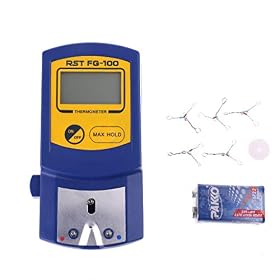
A temperature mismatch doesn’t automatically mean a soldering station is defective. Check it with a suitable tip thermometer, repeat the measurement consistently, and adjust calibration only as the manufacturer directs.
Calibration offset on a cheap station
A cheap soldering station can display a temperature that differs from the actual tip temperature. That does not automatically mean it is faulty: the display may estimate heater temperature, while the tip’s reading changes with the tip, measurement method, and contact. Verify the difference with a suitable tip thermometer before changing calibration, and follow the station’s manual for any adjustment.
Why a cheap station shows a temperature offset
The station’s control sensor may not measure the working end of the tip directly. Even if it does, the displayed temperature and a separate thermometer can disagree because they measure at different points or respond at different speeds.
Other common factors include:
Tip condition: Oxidation, dirt, or poor tinning can make heat transfer and measurement less consistent.
Tip shape and size: A fine tip and a broad tip can behave differently, even at the same station setting.
Measurement technique: The thermometer’s sensor must make consistent contact with the tip. A loose or brief contact can produce a misleading reading.
Temperature changes during use: Touching a joint or adding solder cools the tip temporarily. Comparing a recovering tip with a stabilized reading can make the offset seem larger.
A consistent difference is more useful than a single reading. The key question is whether the station heats reliably and holds a suitable working temperature—not whether its display exactly matches one thermometer reading under every condition.
Product prices and availability are accurate as of the date/time indicated and are subject to change. Any price and availability information displayed on Amazon.com at the time of purchase will apply to the purchase of this product.
Check the reading before changing calibration
Read the station manual. Look for its calibration procedure, supported tip types, warm-up instructions, and whether it has a user-accessible adjustment. Some stations have no calibration control.
Use a suitable tip thermometer. A general-purpose room thermometer is not appropriate for measuring a soldering tip. Follow the thermometer’s instructions; different sensor designs can give different results.
Check the tip. Clean it using the method recommended for that tip, then apply a small amount of solder so the working surface is properly tinned. A badly oxidized or damaged tip can make readings unreliable.
Keep the setup consistent. Use the same tip, measurement point, station setting, and contact method for each reading. Let the station stabilize as directed by its manufacturer.
Repeat the measurement. Take several readings after the tip has recovered. Record the set temperature and the readings rather than relying on one brief measurement.
If readings vary widely, improve the measurement setup and check the tip before attempting calibration. A stable, repeatable difference is a better reason to adjust the station than an isolated mismatch.
Product prices and availability are accurate as of the date/time indicated and are subject to change. Any price and availability information displayed on Amazon.com at the time of purchase will apply to the purchase of this product.
Calibrate safely and consistently
If the manual describes a user calibration procedure, record the original setting first and follow that procedure exactly. Do not assume that a positive or negative offset means the same thing on every station; the adjustment may be defined differently by each manufacturer. Make small changes if the instructions call for them, then repeat the measurement using the same setup.
Do not open a powered station or adjust an internal trimmer unless the manufacturer specifically provides a safe procedure for it. Unplugging equipment does not make every internal component safe to handle. If calibration requires opening the case, or you are unsure about the instructions, contact the manufacturer or a qualified repair professional.
After calibration, check the station at the temperatures you actually use. A station that reads consistently at one point may not be equally accurate across its entire range. For electronics work, a stable tip that transfers heat reliably is often more useful than chasing an exact match to a thermometer with unknown accuracy.
When an offset is acceptable—and when it is not
A small, repeatable difference may be manageable if the station heats consistently, recovers normally, and allows you to make reliable joints at an appropriate setting. Keep a note of any repeatable correction for your measurement setup, but do not treat it as a universal correction for every tip or thermometer.
Consider replacing the tip first if it is damaged, badly oxidized, or incompatible with the station. If a known-good compatible tip still gives erratic readings, the station cannot hold temperature, or the user calibration procedure does not correct a persistent problem, contact the manufacturer or consider replacing the station. Stop using it if you notice damaged wiring, burning smells, unusual electrical behavior, or other signs of an electrical fault; do not open or repair it while connected to power.
FAQ
Is a temperature offset normal on a cheap soldering station?
A difference between the display and a separate tip thermometer can occur because the station and thermometer may measure differently. Check for a repeatable difference using the same tip and measurement method before deciding the station is faulty.
Can I calibrate a soldering station with a multimeter?
Only if the station manufacturer specifies a compatible measurement method and calibration procedure. A general multimeter probe may not be suitable for tip temperatures, and measurement errors can lead to an incorrect adjustment.
Should I open my soldering station to adjust its calibration?
Do not open it for calibration unless the manufacturer provides instructions for that procedure. If adjustment requires access to internal components, ask the manufacturer or a qualified repair professional.
When should I replace the station instead of calibrating it?
Consider replacement if the station remains erratic with a compatible, serviceable tip, cannot hold temperature, or has signs of electrical damage. Check the warranty and manufacturer guidance first.