A grounded soldering tip and a grounded metal chassis are related but not necessarily connected directly to each other. The chassis grounding is primarily an electrical safety feature; grounding or referencing the tip helps control its electrical potential and may support ESD-safe work. The correct arrangement depends on the soldering station’s design, so follow its manual rather than adding a ground wire or relying on a continuity beep.
Setup · Sat Sep 19
Grounded tip and a metal chassis
A soldering iron tip and a station’s metal chassis may both be grounded, but they serve different purposes. Check the station’s design and instructions rather than assuming the tip should connect directly to the chassis.
What each ground does
A soldering station with a metal enclosure may use protective earth to help keep accessible metal parts safe if an internal electrical fault occurs. Whether the enclosure must connect to protective earth depends on the equipment’s construction and safety class. Do not assume every metal-looking station has the same grounding arrangement.
The tip is a separate question. Some stations reference the tip to earth or an ESD ground so it does not build up an unwanted voltage relative to sensitive components. Other designs isolate the heater and tip from earth or use a particular impedance between them. A grounded tip does not mean the tip is connected directly to mains earth in every station.
Station with documented tip-grounding behavior
 FEITA 936D Digital Soldering Station ESD safe for Electronics, 60 Watt Equivalent with Auto Sleep,…FEITA
$13.49 as of
View on Amazon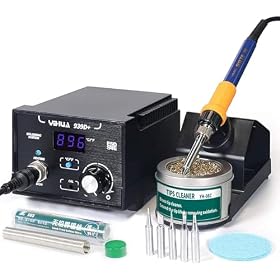 YIHUA 939D+ Digital Soldering Station, 75 Watt Equivalent with Temperature Control, °C/°F Display. ESD safe…YIHUA
$52.99 as of
View on Amazon Xytronic LF-399D Digital Lead-Free ESD-Safe Soldering Station, 80WXytronic
$99.99 as of
View on Amazon
Product prices and availability are accurate as of the date/time indicated and are subject to change. Any price and availability information displayed on Amazon.com at the time of purchase will apply to the purchase of this product.
Why the tip and chassis may not show direct continuity
The tip and chassis can have different electrical paths. A station may connect the chassis to protective earth while keeping the heater circuit isolated, or it may reference the tip to earth through components that a basic continuity test will not identify correctly. A meter’s beep function only indicates that resistance is below its own threshold; it does not verify that an earth connection meets the station’s safety or ESD requirements.
Do not add a wire between the tip, chassis, bench, or building ground to make a meter beep. An improvised connection could defeat isolation, create an unwanted current path, or compromise electrical safety.
Bench grounding for ESD-safe soldering
 Anti Static ESD Mat for Electronics Repair, 17"X25", Grounding KitLUTICO
$22.99 as of
View on Amazon- Anti Static ESD Mat for Electronics Repair, 24"X48", Grounding KitLUTICO
$49.99 as of
View on Amazon  Premium Heat Resistant 932°F 20.9" x 13.5" Anti-Static Mat Includes Static Discharge Grounding Kit, HPFIX…HPFIX
$28.49 as of
View on Amazon
Product prices and availability are accurate as of the date/time indicated and are subject to change. Any price and availability information displayed on Amazon.com at the time of purchase will apply to the purchase of this product.
How to check your station safely
- Read the manual and inspect the markings. Look for the manufacturer’s information on protective earth, tip-to-ground behavior, and any ESD ground terminal. Do not infer the intended design from the enclosure material alone.
- Check the power cord and outlet setup. If the station is designed to use a grounded plug, use an appropriate grounded outlet and an undamaged cord. Do not remove the grounding pin or use an adapter that defeats it.
- Look for a dedicated ground terminal. If the station provides one, use it only as the manual specifies. It may be intended for an ESD mat or another defined connection, not as a substitute for protective earth.
- Use the right test for the question. A basic multimeter can help with simple, unpowered checks, but it cannot certify a station’s protective-earth bond or ESD performance. Do not open the station or take live mains measurements. For a safety check, use a qualified repair professional or appropriate electrical safety testing.
If the case is damaged, the cord or plug is faulty, or you feel a shock or tingling sensation, stop using the station and unplug it if safe to do so. Have it inspected before using it again.
Setting up an ESD-safe work area
For sensitive electronics, use a station and work surface intended for ESD-safe work, and follow the manufacturers’ grounding instructions for the station, mat, and wrist strap. Keep the connections arranged as specified; do not independently connect each item to a different ground point. A grounded tip alone does not make the entire bench ESD-safe, and a grounded mat does not correct a faulty protective-earth connection.
If the station’s manual does not clearly explain its tip or chassis grounding, contact the manufacturer or a qualified technician. The safest choice is to use equipment with documented grounding behavior that suits your work, not to modify an uncertain setup.
FAQ
Should a soldering iron tip have continuity to the metal chassis?
Not necessarily. The tip and chassis may use separate electrical paths, and a station may isolate the tip or connect it to earth in a way a simple continuity test does not characterize. Check the station manual; do not add a wire just to create continuity.
Does a metal soldering station chassis need to be grounded?
It depends on the station’s electrical design and safety class. Follow the product markings and manufacturer instructions. If you suspect a protective-earth fault or the enclosure gives you a shock or tingling sensation, stop using it and have it checked.
Can I use a multimeter to verify that a soldering station is safe?
A basic multimeter can help with limited, unpowered checks, but it does not certify protective-earth integrity or ESD performance. Do not take live mains measurements or open the station for testing; use a qualified professional for safety verification.