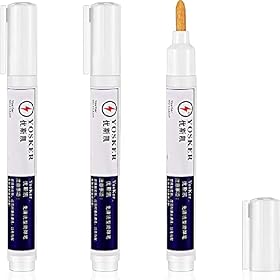
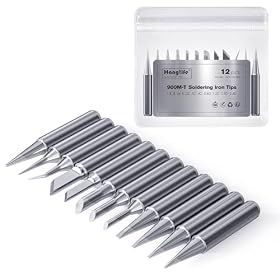
A solder bridge can usually be cleared with flux and solder wick. Disconnect power, inspect the pins closely, then remove excess solder without lingering on the pads.
Stop and inspect
If solder is connecting fine-pitch pins, disconnect the board from power before rework. Let it cool, then inspect the pins under magnification to locate the bridge and check whether nearby pins are also joined. Do not power the board to see whether it works: a short can damage components or the board.
Remove the solder bridge
For most small bridges, solder wick and flux give you controlled removal:
Apply a small amount of electronics flux to the bridged pins.
Place a short piece of solder wick over the bridge.
Touch the wick with a clean, heated iron tip just long enough for the solder to flow into it.
Lift the iron and wick together, then let the area cool before checking your work.
Repeat with a fresh section of wick if solder remains. Avoid dragging the wick across the pins, which can catch or damage them.
Use the iron temperature and tip recommended for your solder, component, and board. Keep contact brief; excessive heat or repeated rework can lift pads or damage a component. If the bridge is stubborn, add a little more flux rather than pressing harder or holding the iron on the pins longer.
For a very small amount of excess solder, a clean tip with a little flux may collect it when touched briefly to the bridge. Wipe the tip and inspect again. If this does not clear the connection, switch to wick instead of repeatedly heating the same spot.
Product prices and availability are accurate as of the date/time indicated and are subject to change. Any price and availability information displayed on Amazon.com at the time of purchase will apply to the purchase of this product.
Check for remaining shorts
After the board cools, inspect the full row of pins under magnification. Look for thin solder strands, hidden connections between pins, or pins that have shifted. If visual inspection is inconclusive and you know how to use a multimeter safely, check for continuity between adjacent pins where the circuit should not connect. Consult the board or component documentation when pins are intentionally connected internally.
Do not reconnect power until you are confident the bridge is gone and the board is dry and clean. Follow the flux maker’s cleanup instructions; some flux residues should be removed, while others are intended to remain.
Product prices and availability are accurate as of the date/time indicated and are subject to change. Any price and availability information displayed on Amazon.com at the time of purchase will apply to the purchase of this product.
Prevent bridges on the next pass
Use enough flux to help solder flow, but avoid flooding the pins with solder.
Choose a tip that can transfer heat to the joint reliably. An extremely fine needle tip is not automatically better; a suitable small chisel or bevel tip may provide better contact, depending on the package and technique.
Feed solder sparingly. If you are hand-soldering a row of leads, drag soldering with a small amount of solder on the tip can be easier to control than adding solder to every pin individually.
Keep the component aligned and stable before soldering. Check alignment again after the first joints.
Use magnification and inspect the entire pin row before powering the board.
Product prices and availability are accurate as of the date/time indicated and are subject to change. Any price and availability information displayed on Amazon.com at the time of purchase will apply to the purchase of this product.
When to replace a part or stop
Replace solder wick when it is saturated or no longer draws solder into itself. Replace a damaged or badly oxidized iron tip if it will not wet with solder after appropriate cleaning and tinning. If pads are lifting, pins are bent, or a component has been overheated, stop repeated rework; further heating can make the damage worse. For a valuable or multilayer board, a repair technician may be the safer next step.
FAQ
Can I fix a solder bridge by adding more solder?
Usually not. More solder can make the bridge larger. Apply flux and use solder wick to remove the excess, then inspect the pins again.
Should I use the smallest possible soldering tip for fine-pitch pins?
Not necessarily. A very fine tip may transfer heat poorly. Choose a tip that fits the work while making reliable contact, and follow the iron and component makers’ guidance.
Can I turn the board on briefly to check whether the bridge matters?
No. Disconnect power until you have inspected the pins and confirmed that unintended connections are gone. A short can damage the board or components.
What if solder wick does not remove the bridge?
Add a small amount of flux, use a fresh section of wick, and keep contact brief. If the solder still will not flow or the pads begin to lift, stop and consider professional rework.