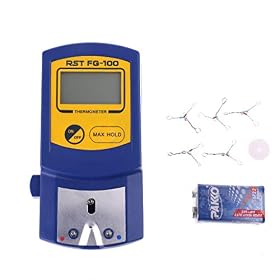
A tip thermometer can help distinguish a temperature-control problem from a dirty tip, poor contact, or incorrect setup. Check the tool carefully before changing calibration settings.
What a tip thermometer can tell you
If your soldering station seems too hot, too cool, or inconsistent, a tip thermometer can show the temperature at the tip rather than relying only on the station’s display. It is a useful diagnostic, but the reading depends on proper contact, the tip shape, and the thermometer’s instructions. One reading by itself does not prove the station is faulty.
How to check the station
Confirm the setup. Make sure the handpiece and tip are approved for the station and seated as the manufacturer specifies. Set the station to a temperature within the tip and solder manufacturers’ guidance.
Prepare the tip. Remove heavy residue with the recommended cleaning method, then apply a small amount of solder to the working area. A clean, tinned tip generally transfers heat to the sensor more consistently.
Let the station stabilize. Wait for the station to indicate it has reached the set temperature, then follow the thermometer’s instructions for when and how to take a reading.
Measure consistently. Place the working face of the tip against the thermometer’s sensor as directed. Avoid changing the contact point or pressure between readings, and do not hold the tip against the sensor longer than the thermometer instructions recommend.
Repeat the measurement. Take a few readings using the same method. Allow the tip to recover between readings if needed. Large swings can point to inconsistent contact or a tip that is not clean, as well as a station issue.
Compare with the manufacturer’s guidance. Check the station manual for its stated accuracy or calibration procedure. There is no single acceptable error range for every station and thermometer combination.
Product prices and availability are accurate as of the date/time indicated and are subject to change. Any price and availability information displayed on Amazon.com at the time of purchase will apply to the purchase of this product.
Interpret the result before adjusting anything
A stable reading near the set temperature is reassuring, but it does not guarantee ideal heat transfer during soldering. A small tip, oxidized surface, or difficult joint can lose heat quickly even when the station reaches its target temperature.
If the reading is consistently far from the set point, first repeat the check with a clean, compatible tip and confirm the thermometer is being used correctly. If possible, check another compatible tip. A damaged or unsuitable tip can affect the measurement and real-world performance.
Do not change a calibration offset just to make one thermometer reading match the display. Follow the station maker’s calibration procedure, and only adjust it if the thermometer is suitable for that procedure. If readings remain outside the station’s stated tolerance, contact the manufacturer or a qualified repair service. A station that cannot hold temperature, behaves unpredictably, or shows signs of electrical damage should be taken out of service until it is checked.
Choosing a tip thermometer
Look for a thermometer intended for soldering iron tips, with a sensor and temperature range suitable for your work. Check that its instructions explain where to place the tip and how to interpret readings. A convenient display is helpful, but repeatable measurement and clear instructions matter more than extra features. If you only need to verify occasional temperature problems, a standalone tip thermometer is usually more practical than replacing a functioning station based on its display alone.
Safety while measuring
The tip and sensor can become hot enough to cause burns. Keep the hot tip away from cords and flammable materials, use the thermometer’s holder or protective features as directed, and let components cool before handling them. Do not open the station or make electrical adjustments unless the manufacturer’s procedure specifically calls for it and you are qualified to do so.
FAQ
Can a tip thermometer prove that my soldering station is accurate?
It can help check the temperature at the tip, but the result depends on the thermometer, tip condition, contact method, and the station’s published tolerance. Follow the manufacturer’s measurement and calibration procedures.
Why does my tip thermometer give different readings each time?
Inconsistent sensor contact, residue or oxidation on the tip, a changing measurement location, or not allowing the tip to stabilize can all affect readings. Repeat the check with a clean, tinned tip and the same technique.
Should I adjust the station calibration if the readings do not match?
Not based on a single reading. Check the station manual and repeat the measurement with a suitable thermometer. Use only the manufacturer’s calibration procedure; contact the maker or a qualified repair service if the reading remains outside its stated tolerance.