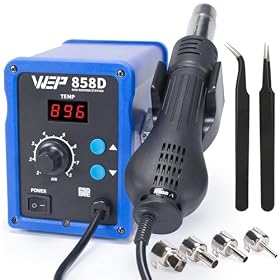
A copper ground plane pulls heat away from the joint. Before turning up the temperature, check your tip, contact, and setup; then decide whether a more capable station is needed.
When 30 watts is not enough for a ground plane
A 30-watt soldering iron may struggle to solder a joint connected to a large copper ground plane because the plane spreads heat away faster than the iron can replace it. A clean, broad tip and good contact may solve the problem; if they do not, a temperature-controlled station with better heat recovery—or a suitable board preheater—may be needed. Simply setting the iron hotter is often not the best first move.
Why a ground plane overwhelms a small iron
The wattage rating describes how quickly an iron can supply heat, not how hot its tip will always be. A ground plane is a large area of copper that conducts heat away from the pad and joint. The larger the copper area and the stronger its connection to the joint, the more heat the tool must deliver to keep solder flowing.
A small or pointed tip can make the problem worse. It may touch only a tiny part of the pad, so heat transfer is poor even if the tip is hot. The tip temperature can also drop during contact, especially with an iron that has limited power or slow recovery.
Some PCB layouts use thermal-relief spokes to connect a pad to the ground plane through narrower copper paths. If a pad has a solid connection to the plane instead, it can be much harder to heat. Check the board layout if it is available; do not cut or damage the ground plane as a shortcut.
Product prices and availability are accurate as of the date/time indicated and are subject to change. Any price and availability information displayed on Amazon.com at the time of purchase will apply to the purchase of this product.
Check the joint before increasing temperature
Work through these checks first:
Use a clean, tinned tip. Oxidation and residue interfere with heat transfer. Clean and tin the tip according to the iron manufacturer’s instructions.
Try a broader tip that fits the pad. A chisel or bevel tip can transfer heat more effectively than a fine conical tip when the pad is large. Use the largest tip that lets you work without touching neighboring pads or parts.
Make solid contact. Touch the pad and the component lead together, if accessible, rather than melting solder on the tip and dropping it onto the joint. Feed solder into the heated joint so it wets both surfaces.
Use suitable flux. Fresh electronics flux can help solder wet the surfaces. Use electronics-grade flux and follow its cleanup instructions; plumbing flux is not appropriate for circuit boards.
Check the solder and temperature setting. Confirm the solder is suitable for electronics and set the iron within the range recommended for the solder, component, and tool. Lead-free solder may need more heat input, but raising the set point excessively can damage pads, components, or the tip.
Look for a layout or setup issue. A pad tied directly to a large plane may need more heat than a thermally relieved pad. Also confirm the iron is fully heated and that its tip is securely fitted as directed by the manufacturer.
If solder still will not wet the joint, stop rather than holding the iron on the board for a long time. Prolonged heating can lift a pad or damage a component.
Product prices and availability are accurate as of the date/time indicated and are subject to change. Any price and availability information displayed on Amazon.com at the time of purchase will apply to the purchase of this product.
What to change
Try a larger compatible tip before replacing the iron. Tip shape and contact area often matter more than a small increase in temperature. Keep the tip clean, and make sure the replacement tip is compatible with your specific iron or station.
If the board is still drawing heat away, use a temperature-controlled station with enough power and thermal recovery for the work. A higher wattage rating can help the tool maintain heat under load, but wattage alone does not guarantee good performance. Tip compatibility, temperature control, and recovery behavior also matter.
For a large board or a particularly stubborn joint, controlled preheating can reduce the temperature difference between the board and the soldering iron. Use equipment intended for PCB work and follow its instructions, especially around heat-sensitive components and plastics.
When to move to a more powerful station
A more capable station is reasonable if a properly maintained iron with an appropriately broad tip repeatedly loses heat on ground-plane joints, or if you regularly solder large boards and heavy copper connections. Choose based on the station’s specified power, temperature control, compatible tip options, and the type of work you do—not wattage alone.
If the iron is not heating normally even on ordinary joints, inspect its cord, connector, tip fit, and settings only as permitted by the manufacturer. Unplug it before changing tips or performing maintenance. Do not open or repair a mains-powered station unless you are qualified; have it serviced or replace it if it is faulty.
FAQ
Can a 30-watt soldering iron solder a ground plane?
Sometimes. It may handle small or thermally relieved pads with a clean, suitably broad tip, but a large solid copper plane can draw heat away faster than the iron can replace it.
Should I turn the temperature way up to solder a ground plane?
Not as a first step. Check tip cleanliness, tip size, contact, flux, and solder compatibility first. Excessive temperature or prolonged contact can damage the board, components, or tip.
Is a higher-wattage soldering station always better?
No. Power can improve heat recovery, but temperature control, tip fit, and available tip shapes also affect performance. Choose a station suited to your work rather than relying on wattage alone.