The best soldering iron for a beginner is usually a temperature-controlled iron or compact station with interchangeable tips, stable heat, comfortable handling, and readily available replacement parts.
The best soldering iron for a beginner is usually a temperature-controlled iron or compact soldering station with interchangeable tips, stable heat, a comfortable grip, and easy-to-find replacement parts. A simple fixed-temperature pen can work for occasional repairs, but adjustable temperature makes it easier to learn, work on different components, and avoid damaging circuit boards.
What beginners should look for
Adjustable temperature control
Temperature control is more useful than choosing an iron based only on its wattage. Different jobs need different heat levels, and the correct setting depends on the solder, joint size, component, and circuit board.
A beginner-friendly iron should let you adjust the temperature and display or clearly indicate the setting. Digital controls are convenient, but a well-designed analog control can also work. Look for stable temperature regulation rather than simply the highest maximum temperature.
Use the solder manufacturer's recommendations as a starting point. Lead-free solder generally requires more heat than traditional leaded solder, while delicate components and lifted pads call for extra care. Avoid leaving the iron at a high setting when it is not needed.
Replaceable, commonly available tips
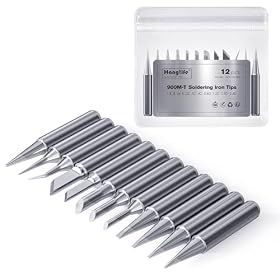
Tips wear out, become contaminated, and can be damaged by abrasive cleaning. Choose an iron that accepts replaceable tips in a size and shape that are easy to find.
A beginner will usually get the most use from:
A medium chisel tip for transferring heat to many general-purpose joints
A small chisel tip for compact electronics work
A fine conical tip for access in tight spaces, although very fine tips are not always the easiest to learn with
Tip compatibility matters. Before buying, check that replacement tips are available for the specific iron and that the included tips match the work you plan to do.
Enough power for heat recovery
Wattage indicates the iron's potential heating capacity, but it does not by itself determine soldering performance. A low-powered iron may struggle when the joint is connected to a large ground plane or a thick wire. An iron with good temperature control and heat recovery can handle changing loads more effectively.
For basic circuit-board work, prioritize controlled, consistent heating over an unusually high wattage rating. If you expect to solder heavy wires, connectors, or large metal areas, choose equipment designed for that workload rather than assuming a small electronics iron will be suitable.
A comfortable, heat-resistant grip
Beginners often hold the iron longer than experienced users while positioning the work. The handle should feel balanced, provide a secure grip, and keep your hand away from the hot shaft and tip.
A flexible cord can make it easier to position the iron without pulling on the workpiece. A stable stand is also important: it should hold the iron securely with the hot tip pointed away from your hands and nearby objects.
Tip temperature recovery and idle features
Temperature recovery is the ability to return to the selected temperature after the tip contacts a joint. This helps create consistent solder joints. Product descriptions may describe this as fast heating or temperature recovery, but these claims are not always directly comparable between manufacturers.
Sleep or automatic shutoff features can reduce wear and improve safety when the iron is left in its stand. Check the instructions to understand how the feature works and whether it can interrupt a long soldering session.
Soldering iron or soldering station?
Choose a soldering station when you want control and room to grow
A station separates the control unit from the handpiece and usually provides a stable stand, temperature adjustment, and replaceable tips. It is generally the better long-term choice for electronics learning, regular repairs, and projects involving different component sizes.
A station also keeps the heavier controls off the work surface near the joint. Its disadvantages are greater cost, a larger footprint, and more parts to store.
Choose a soldering pen for occasional, simple work
A temperature-controlled soldering pen is compact and convenient for occasional repairs. It can be a good choice if storage space is limited or you only need to attach wires and make straightforward board repairs.
A fixed-temperature pen is the least expensive and simplest option, but it offers less flexibility. It may be adequate for infrequent work with similar solder and joint sizes, but it is harder to adapt when you move to different materials or more delicate components.
Be cautious with USB-powered irons
USB-powered irons can be useful for portable work, but their performance depends on the power source, cable, and supported charging standard. Some power banks and USB adapters may not provide enough power for demanding joints.
If you choose one, verify the required input and use a compatible power supply. Do not assume that any USB port will provide the stated performance.
Temperature-controlled stations for learning electronics
Product prices and availability are accurate as of the date/time indicated and are subject to change. Any price and availability information displayed on Amazon.com at the time of purchase will apply to the purchase of this product.
Features that are helpful but not essential
These features can improve convenience, but they should come after temperature control, tip availability, safe storage, and comfortable handling:
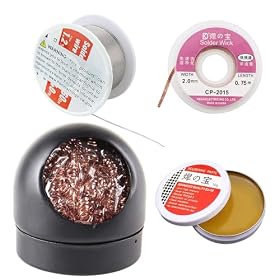
A stand with a brass-wool cleaner and sponge option
A built-in light can help illuminate the joint, but it does not replace good task lighting. Likewise, a large accessory kit is not automatically better if it contains poor-quality tips or solder you do not need.
Product prices and availability are accurate as of the date/time indicated and are subject to change. Any price and availability information displayed on Amazon.com at the time of purchase will apply to the purchase of this product.
What else a beginner needs
An iron alone is not enough for safe, repeatable soldering. Plan for the following:
Ventilation or a fume extractor positioned to draw fumes away from your face
Do not use plumbing flux on electronic circuit boards. It can be corrosive and may damage the board over time. Wash your hands after handling solder, particularly when using lead-containing solder, and follow the solder manufacturer's safety guidance.
Product prices and availability are accurate as of the date/time indicated and are subject to change. Any price and availability information displayed on Amazon.com at the time of purchase will apply to the purchase of this product.
A simple beginner buying checklist
Before choosing an iron, confirm these points:
Temperature control: Can you adjust it for different solder and component types?
Tip system: Are replacement tips available in useful sizes?
Heat performance: Is it intended for the kind of joints you will make?
Safety: Does it include a stable stand and a secure resting position?
Ergonomics: Can you hold and reposition it comfortably?
Power requirements: Will it work with the outlet, adapter, or USB supply you have?
Replacement parts: Can you obtain tips, handpieces, or other wear parts if needed?
Included accessories: Does the package include genuinely useful basics, or mostly filler?
For most beginners working on electronics, a temperature-controlled station with a medium tip, a fine tip, a secure stand, and readily available replacement tips is the safest general recommendation. Choose a more compact pen when portability and occasional use matter more than expansion. Choose specialized equipment only when you know you will solder large wires, connectors, or other heat-demanding work.
Product prices and availability are accurate as of the date/time indicated and are subject to change. Any price and availability information displayed on Amazon.com at the time of purchase will apply to the purchase of this product.
Basic setup and first-use tips
Place the station on a stable, nonflammable surface with the stand positioned so the hot tip cannot contact tools, cords, paper, or plastic. Set the temperature according to the solder and component guidance rather than immediately selecting the maximum setting.
Tin the clean tip with a small amount of solder before making a joint. Touch the tip to both surfaces being joined, then feed solder into the heated joint—not directly onto the tip. Remove the solder and then the iron, allowing the joint to cool without movement.
A good joint should be mechanically secure and evenly wetted. If solder forms a ball, the surfaces may be dirty, inadequately heated, or missing suitable flux. If insulation, pads, or nearby components discolor or lift, reduce the heat exposure and review the technique and temperature.
Never leave a hot iron unattended. Unplug it when finished and allow it to cool in its stand before storage. For mains-powered equipment, inspect the cord and plug before use and stop using the unit if they are damaged.
Bottom line
For most beginners, buy a temperature-controlled soldering station or pen with replaceable standard tips, dependable temperature regulation, a comfortable handle, and a stable stand. Do not choose solely by maximum temperature or wattage. Tip availability, safe handling, heat control, and suitability for your actual projects will have a greater effect on how easy the tool is to learn and use.
FAQ
What temperature should a beginner soldering iron be?
Use the solder and component manufacturer's guidance as a starting point. The appropriate setting varies with solder type, joint size, board design, and component sensitivity. Avoid using maximum temperature by default, and use the lowest setting that heats the joint effectively.
Is a soldering station better than a soldering iron?
A station is usually better for regular electronics work because it provides temperature control, a stable stand, and replaceable tips. A compact temperature-controlled pen may be sufficient for occasional repairs or when portability and storage space are priorities.
How much wattage does a beginner soldering iron need?
There is no single wattage that suits every beginner. Wattage alone does not indicate temperature stability or heat recovery. Choose equipment intended for your work, prioritizing adjustable temperature control and adequate heat recovery over the highest wattage rating.
What soldering iron tip should a beginner use?
A medium chisel tip is a versatile starting point because it transfers heat well to common component leads, pads, and wires. Add a smaller chisel or fine tip when the work requires better access.
Do beginners need a fume extractor?
Good ventilation is important, and a fume extractor can help draw smoke away from your breathing zone. Position it near the work without blocking your view, and follow safety guidance for the solder and flux being used.