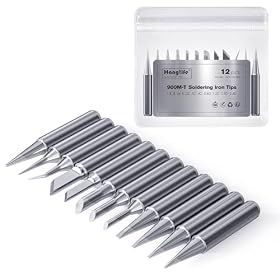
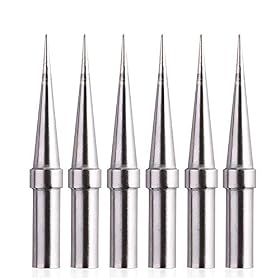
Buying chisel and conical tips together can cover most electronics work, but only if the tips fit your soldering iron and match the jobs you do. Here is what to check before ordering.
A chisel-and-conical tip set is a practical way to expand a soldering station without buying a large assortment. The key is compatibility first: tips must match your iron or station’s tip system, heater design, and supported size range. After that, choose the chisel width for general joints and the conical diameter for precision work.
Why buy chisel and conical tips together?
These two shapes cover different soldering tasks:
Chisel tips have a flat face that transfers heat efficiently. They are useful for wires, through-hole components, connector pins, ground planes, and many general-purpose joints.
Conical tips have a pointed working area for access around closely spaced pins, small pads, and other detailed work.
A chisel tip is usually the better default for transferring heat into a joint. A very fine conical tip can reach tight spaces, but its small contact area may transfer heat less effectively and can require more time at the joint.
Check compatibility before comparing tip shapes
Tip shape and size do not matter if the replacement cannot attach to your soldering iron. Check the following details in the station’s manual, product listing, or manufacturer’s replacement-tip chart.
Tip series and attachment system
Soldering tips are not universal. Different irons may use cartridges, slip-on tips, screw-retained tips, or other proprietary systems. Even tips that look similar may have different internal dimensions or heater arrangements.
Search using the exact soldering iron or station model followed by terms such as “replacement tips” or “tip set.” If the listing does not clearly identify compatibility, do not assume the tip will work.
Heater and temperature-sensing design
Some soldering systems place the heater and temperature sensor inside the tip cartridge. Others use a separate heater in the iron and a removable tip sleeve. These systems generally require different replacement parts.
Using an incompatible tip can lead to poor heating, inaccurate temperature control, physical looseness, or damage. Follow the station manufacturer’s instructions rather than forcing a tip that does not fit.
Tip length and collar shape
The overall length, shoulder, collar, and internal bore can affect how far the tip sits inside the handpiece. A tip that is the correct general shape but has the wrong length may not heat correctly or may leave part of the heater exposed.
Product prices and availability are accurate as of the date/time indicated and are subject to change. Any price and availability information displayed on Amazon.com at the time of purchase will apply to the purchase of this product.
Choosing a useful chisel tip
For a general-purpose chisel, look for a medium width that can contact an ordinary solder pad without covering neighboring pads. The best size depends on the work you do and the scale of your circuit boards.
Smaller chisels
Smaller chisel tips are useful for:
Fine-pitch components with adequate pad spacing
Small through-hole pads
Short wire connections
General board repair where access is limited
They offer more control than a broad tip, but they hold less heat and may struggle with large copper areas.
Medium chisels
A medium chisel is often the most versatile second tip for an electronics-focused setup. It provides a useful flat face for feeding solder, heating a lead and pad together, and handling ordinary wires and connectors.
Wider chisels
Wider tips work well for larger wires, heavy ground planes, shield tabs, and heat-spreading surfaces. They may be too large for crowded boards, so they are most useful when your projects regularly include substantial metal or copper areas.
Product prices and availability are accurate as of the date/time indicated and are subject to change. Any price and availability information displayed on Amazon.com at the time of purchase will apply to the purchase of this product.
Choosing a useful conical tip
Conical tips are best selected by diameter rather than by the word “fine” alone. An extremely narrow point may look precise but can transfer heat poorly, especially on boards with larger pads or ground planes.
Choose a conical tip that is narrow enough to reach your joints while still providing a practical amount of metal at the working end. For small electronics, a fine or medium-fine cone is often more useful than the smallest available point.
A conical tip can be helpful for:
Reaching between closely spaced pins
Touching small pads
Reworking individual solder bridges or joints
Working around nearby components
For repeated work on very small surface-mount parts, a fine conical tip may be useful, but it should complement—not replace—a better heat-transferring chisel or small bevel tip.
Product prices and availability are accurate as of the date/time indicated and are subject to change. Any price and availability information displayed on Amazon.com at the time of purchase will apply to the purchase of this product.
What tip material and plating affect
Most modern replaceable soldering tips use a plated working surface over a conductive metal core. The plating helps the tip resist solder erosion and maintain its shape during normal use.
Look for tips described as compatible with your station and intended for electronics soldering. Avoid abrasive cleaning methods that can damage the working surface. Do not file or sand a plated tip unless the manufacturer specifically permits it; removing the plating can quickly ruin the tip.
Tip longevity also depends on temperature, flux chemistry, cleaning habits, and how long the tip remains hot without solder on it. Keep a small amount of solder on the working surface during idle periods when appropriate for your station’s instructions.
What a sensible two-tip combination looks like
For a general electronics setup, a practical pair is usually:
A small-to-medium chisel for everyday joints and better heat transfer.
A fine-to-medium conical tip for access and detail work.
If you mostly solder wires, connectors, or through-hole parts, prioritize a medium chisel and choose a conical tip as the secondary option. If you mainly repair compact circuit boards, choose a smaller chisel and a conical tip sized for the pin spacing you encounter.
A bundle containing two tips of nearly identical size may offer less useful coverage than two different working sizes. Check the actual tip dimensions rather than relying only on labels such as “standard,” “fine,” or “precision.”
Common buying mistakes
Buying by shape without checking the station
A chisel or conical tip is not interchangeable across every soldering iron. Confirm the exact tip family first.
Choosing the finest possible tip
The smallest tip is not automatically the most precise in practice. If it cannot deliver enough heat, joints may take longer, solder may not flow evenly, and you may need to raise the temperature unnecessarily.
Ignoring the workpiece size
A tip suited to tiny pads may be frustrating on a ground plane or thick wire. Match the contact area to the joint, while keeping enough clearance from nearby parts.
Buying more tips than you can store and maintain
A small compatible set is often more useful than a large assortment of shapes you rarely use. Add specialty tips only when a recurring job justifies them.
How to care for the tips after buying them
Use the manufacturer-approved temperature range for the tip and station.
Keep the working surface lightly tinned when the iron is hot.
Clean with the station-approved brass wool, sponge, or other method.
Avoid scraping, filing, or abrasive pads unless explicitly approved.
Do not grip or twist a hot tip with ordinary pliers.
Let the iron cool before changing a removable tip, unless the manufacturer provides a safe hot-swap procedure.
Replace the tip when the working surface becomes badly pitted, no longer wets with solder, or has lost its intended shape.
If a new tip heats unevenly, fits loosely, or is not recognized by a cartridge-based station, stop using it and recheck the compatibility information. If the correct replacement still behaves abnormally, the handpiece, heater, sensor, or station may need service by a qualified technician or replacement according to the manufacturer’s guidance.
FAQ
Are chisel tips better than conical tips for electronics?
Neither is best for every job. Chisel tips generally transfer heat more efficiently and are useful for everyday joints, while conical tips provide access to smaller or more crowded areas.
Can I use any chisel or conical tip on my soldering iron?
No. Tips must match the iron or station’s specific tip series, attachment system, dimensions, and sometimes its heater and temperature-sensing design.
What two tip shapes should a beginner buy first?
A small-to-medium chisel plus a fine-to-medium conical tip is a useful starting combination for many electronics projects. Choose the sizes based on your typical pad, pin, wire, and connector sizes.
Why does a very fine conical tip heat poorly?
Its small contact area and limited thermal mass may transfer less heat to the joint. A slightly larger conical tip or a small chisel can often heat the joint more effectively while still providing adequate control.
When should a soldering tip be replaced?
Replace it when the working surface is badly pitted, will not wet with solder after proper cleaning and tinning, has lost its shape, or no longer transfers heat normally. Confirm that the problem is not caused by an incompatible tip or incorrect maintenance.