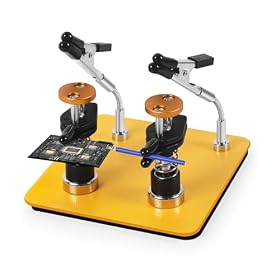
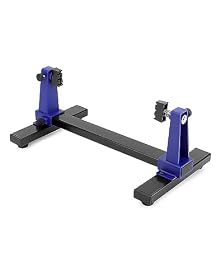
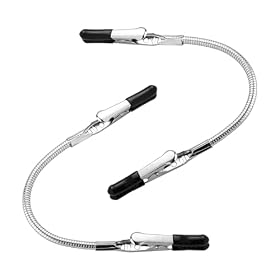
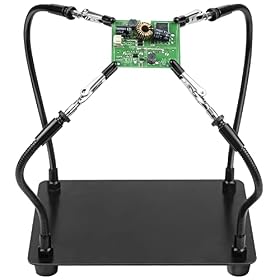
Helping hands are flexible and inexpensive, while a PCB vise usually provides steadier, more repeatable support. Choose based on board size, access, soldering precision, and how often you reposition your work.
Helping hands and PCB vises solve the same basic problem: keeping a circuit board still while you solder. Helping hands are usually the better choice for occasional repairs, irregularly shaped boards, and jobs where you need to change the board's angle often. A PCB vise is usually better when stability, repeatable positioning, and access to both sides of a board matter more than flexibility.
Helping hands: flexible and affordable support
A helping-hands tool typically uses one or more adjustable arms with alligator clips, clamps, or interchangeable holders. The arms can be repositioned around a circuit board, wire, connector, or small component.
Advantages of helping hands
Flexible positioning: Arms can hold a board at many angles.
Useful for mixed tasks: They can hold wires, heat-shrink tubing, connectors, and components as well as PCBs.
Low space and cost requirements: Basic versions are compact and easy to store.
Good for irregular shapes: Separate clips can grip areas that would not fit neatly in a fixed vise.
Easy access around the board: You can often place the clips away from the solder joints you need to reach.
Limitations of helping hands
They can move under pressure: Pushing a soldering iron, desoldering pump, or wire into a board may shift the assembly.
Clip pressure can damage boards: Bare metal jaws may scratch solder mask, crush thin edges, or mark components.
Adjustment takes time: Several arms may need to be repositioned for each board.
Small clips can obstruct access: The clip that stabilizes a board may be close to the work area.
Heavy boards can overwhelm the base: A light base or narrow arm may tip or rotate when the board is moved.
Helping hands work best when you need adaptable support and can solder with a light touch. Models with broad, stable bases and insulated or padded gripping surfaces are generally easier to use safely around populated boards.
PCB vises: steadier and more repeatable
A PCB vise holds a circuit board between fixed or adjustable jaws. Depending on the design, the jaws may clamp the board by its edges, support it in a rotating frame, or hold it above the base so both sides are accessible.
Advantages of a PCB vise
Better resistance to movement: A rigid vise is less likely to shift when you apply pressure.
Consistent positioning: You can clamp boards at a repeatable height and angle.
Improved access to both sides: Rotating or open-frame designs can make through-hole soldering and rework easier.
More even support: Long jaws or multiple contact points distribute clamping force better than one small clip.
Faster for repeated work: Once adjusted, a vise can hold similar boards with little repositioning.
Limitations of PCB vises
Less adaptable: A fixed jaw arrangement may not suit unusually shaped or very small boards.
Potential for over-tightening: Excessive clamping force can damage thin PCBs or fragile edge components.
Larger footprint: A stable vise often takes more bench space than a simple helping-hands tool.
More board clearance is required: The jaws need a safe gripping area that will not interfere with components or connectors.
Some designs restrict access: A solid jaw or frame can block the exact area you need to solder.
A PCB vise is usually the better fit for frequent electronics work, especially when you assemble multiple boards, solder through-hole components, or need the board to remain still while making deliberate joints.
Product prices and availability are accurate as of the date/time indicated and are subject to change. Any price and availability information displayed on Amazon.com at the time of purchase will apply to the purchase of this product.
Key differences that affect your choice
Stability
Choose a PCB vise if stability is your top concern. A helping-hands tool can be stable enough for light soldering, but its articulated arms create more opportunities for movement. This matters when working with stiff wires, desoldering braid, or connectors that require force to seat.
A wide, heavy base can improve helping-hands stability, but it does not eliminate movement at the joints or clips. A vise with a solid base and protected jaws generally provides more predictable support.
Board protection
Neither tool should clamp directly onto delicate components or apply unnecessary force. Look for padded, smooth, or non-marring contact surfaces. If a helping-hands clip has sharp or hard jaws, add a suitable protective layer without placing material where it could loosen and fall into the work.
For a PCB vise, confirm that the jaw range matches the board thickness and that the clamping points contact the board's edges rather than components. Tighten only enough to prevent movement. A vise is not a substitute for careful pressure control.
Access to the soldering area
Helping hands provide more freedom to place support away from a particular joint. This is useful for small repairs, odd-shaped boards, and wires that need to be held at a specific angle.
A PCB vise may provide better overall access when it has an open frame or rotation mechanism. It can also make it easier to turn a board without unclamping it. However, a vise with bulky jaws may block edge connectors, switches, or components near the perimeter.
Repositioning speed
Helping hands are convenient when every job is different. You can move the arms and clips independently, but frequent adjustment can become tedious.
A PCB vise is more efficient for repeated work. Set the jaw spacing and angle once, then load similar boards in the same position. If your projects vary widely in size and shape, the flexibility of helping hands may matter more than this speed advantage.
Board size and shape
Helping hands are often more forgiving with small, irregular, or oddly shaped boards because the clips can be placed wherever there is a safe gripping point. They can also support loose wires and parts that a vise cannot clamp.
A PCB vise is a stronger choice for rectangular boards with clear edges. Before buying one, check its usable clamping range, minimum board size, maximum board thickness, and whether the jaws leave enough room for connectors and components. These specifications matter more than the tool's overall dimensions.
Product prices and availability are accurate as of the date/time indicated and are subject to change. Any price and availability information displayed on Amazon.com at the time of purchase will apply to the purchase of this product.
Which should you choose?
Choose helping hands when:
You solder only occasionally.
Your projects include wires, connectors, and irregularly shaped boards.
You need to change angles frequently.
Bench space and portability matter.
You prefer a lower-cost, multipurpose holder.
Choose a PCB vise when:
You solder regularly or assemble multiple similar boards.
Movement during soldering is your main frustration.
You need repeatable positioning.
You work on through-hole boards or need access to both sides.
Your boards have safe, accessible edges for clamping.
If you work on a wide range of projects, owning both can make sense: use a PCB vise for stable board work and helping hands for wires, components, or unusual assemblies. If you are buying only one, match the tool to the kind of work you do most often rather than choosing based only on price or appearance.
Product prices and availability are accurate as of the date/time indicated and are subject to change. Any price and availability information displayed on Amazon.com at the time of purchase will apply to the purchase of this product.
Features worth prioritizing
For helping hands
Prioritize a heavy or wide base, smooth arm adjustment, secure joints, and insulated or padded clips. A magnifier can be useful for inspection, but it should not be the main reason to choose a model if the arms are difficult to lock in place. Check whether replacement clips, tips, or arms are available if the tool uses a modular system.
For a PCB vise
Look for protected jaws, a useful clamping range, a stable base, and enough clearance around the board. A rotating mechanism can help with inspection and backside soldering, but it should lock securely at the working angle. If you solder small boards, verify that the jaws can grip them without covering the work area.
For either tool
Avoid placing plastic parts, foam, or unknown materials directly against a hot soldering iron or freshly soldered joint. Keep the holder clear of the iron stand and route cords so they cannot pull the tool or catch on the board. Follow the holder manufacturer's temperature and usage instructions.
A practical setup for cleaner soldering
Place the holder on a level, uncluttered part of the bench.
Clamp the board only at strong, clear areas such as unpopulated edges.
Position the board so the soldering iron can approach without crossing your hand or power cord.
Check that the board does not move when you lightly touch the intended work area.
Keep solder, flux, cutters, and desoldering tools within reach but outside the iron's resting area.
Use ventilation or a suitable fume extractor, especially when soldering for extended periods.
Let hot parts cool before repositioning the board or loosening the clamp.
If the board still shifts, first reduce the force needed at the joint: trim wire ends, support a lead, or adjust the board angle. Then improve the holder's base or contact points. Do not compensate for poor stability by gripping the board so tightly that it may crack or deform.
Bottom line
Helping hands are the more versatile choice for occasional, varied soldering. A PCB vise is the better choice for firm, repeatable support and frequent board assembly. The most important specifications are not magnification or accessory count but base stability, safe jaw contact, usable board range, and access to the area you need to solder.
FAQ
Are helping hands good for soldering PCBs?
Yes. Helping hands are suitable for many PCB soldering jobs, particularly small repairs, wires, and irregular boards. Choose a stable base and protect the board from hard clip jaws. A PCB vise is usually steadier for repeated or force-intensive work.
Can a PCB vise damage a circuit board?
It can if the jaws contact components, grip too tightly, or clamp a fragile board edge. Use protected contact surfaces, clamp only strong clear areas, and apply no more force than needed to prevent movement.
Do I need both helping hands and a PCB vise?
Not necessarily. Choose helping hands for flexibility or a PCB vise for stability. Having both is useful if you regularly alternate between board assembly and work involving loose wires or unusually shaped parts.
What is better for through-hole soldering?
A stable PCB vise is often better because it resists movement and can make the underside of the board easier to access. Helping hands can also work if the board is held securely and the clips stay clear of the soldering area.