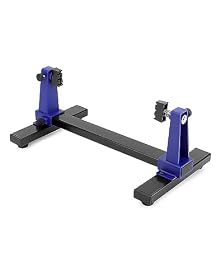
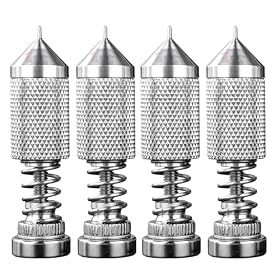
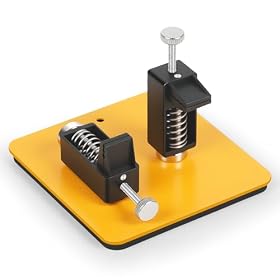
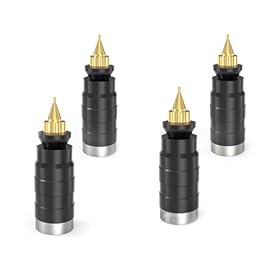
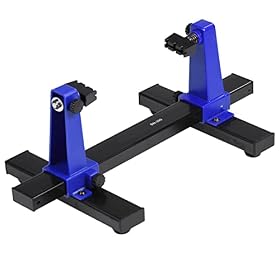
A PCB holder with rotating jaws can make soldering, inspection, and rework easier by keeping the board secure while allowing access to both sides. Here are the specifications that matter before you buy.
A PCB holder with rotating jaws keeps a circuit board stable while you solder, inspect, or rework components. The useful features are not just rotation: jaw opening, clamping pressure, board protection, base stability, and how easily the holder can expose both sides of the PCB all affect whether it helps or becomes another source of frustration.
What a rotating PCB holder does
Most holders use two jaws to grip the edges of a circuit board. A pivot or rotating mechanism then lets you turn or tilt the board without completely removing it from the clamp.
This is useful when you need to:
Solder components on both sides of a board
Inspect joints from different angles
Hold a PCB at a comfortable working height
Keep the board steady while routing wires or probing connections
Reposition a board without disturbing nearby components
A holder is especially useful for through-hole soldering and rework. For very small surface-mount work, it can still help, but a stable work surface, magnification, and controlled soldering technique may matter more than a large rotating range.
Specifications that matter when choosing one
Jaw opening and board compatibility
Check the holder’s minimum and maximum jaw spacing against the boards you normally work on. A holder that accepts only a narrow range may be inconvenient if you work on both small modules and larger boards.
Also check how the jaws grip the PCB. Edge clamping is generally preferable to pressing on components, connectors, or solder joints. Some designs accommodate boards in different orientations, while others are best suited to rectangular PCBs with clear edges.
Rotation and locking
Rotation is only useful if the holder can stay in position. Look for a mechanism that allows controlled turning and locks securely at the desired angle.
A holder that rotates freely without a reliable lock can let the board shift while you solder. That movement is particularly inconvenient when working with small pads, fine-pitch components, or wires that need to stay aligned.
Consider whether you need:
A full turn around a central axis
Tilting as well as horizontal rotation
Multiple locking positions
One-handed adjustment or two-handed adjustment
A broad range of movement is helpful, but a firm lock is usually more important than the maximum rotation specification.
Jaw padding and PCB protection
Bare metal jaws can scratch solder mask, damage board edges, or slip on smooth PCBs. Look for jaws with nonconductive, nonmarring contact surfaces or a design that lets you add protective pads.
The padding should be secure and reasonably heat-resistant for normal soldering work. Do not assume every soft pad is suitable for direct contact with a hot soldering iron or molten solder. Keep the iron away from the holder and follow the holder manufacturer’s temperature guidance.
Base stability
A rotating holder needs a base that resists tipping and sliding. A heavier base can improve stability, but footprint and surface grip also matter.
Look for features such as:
A wide base
Rubber feet or other non-slip contact points
Mounting holes if you want to attach it to a bench
Enough clearance for cables, probes, and a soldering iron
A lightweight holder may be adequate for small boards, but it can move when you apply pressure with a probe or component lead. If your workbench is crowded, check the base dimensions before buying.
Adjustment range and access
The jaws should allow access to the area you are soldering without blocking connectors or tall components. Some holders have fixed-height jaws, while others provide height or angle adjustment.
Think about the largest component height you commonly encounter. A holder that grips the board securely but places a heat sink, connector, or capacitor directly against the frame may limit access.
Materials and heat resistance
Aluminum and steel are common in bench PCB holders because they provide rigidity. Plastic parts can reduce weight and cost, but the design still needs to resist flexing when the board is clamped.
No PCB holder should be treated as a heat shield. Keep the soldering iron tip, hot-air nozzle, and freshly soldered joints away from plastic parts, jaw pads, and adjustment hardware unless the manufacturer specifically states otherwise.
Product prices and availability are accurate as of the date/time indicated and are subject to change. Any price and availability information displayed on Amazon.com at the time of purchase will apply to the purchase of this product.
How to use a rotating PCB holder safely
Turn off and unplug the soldering iron when positioning the board. Adjust the holder before bringing a hot tool near it.
Place the jaws on clear board edges. Avoid clamping over components, fragile connectors, or exposed solder joints.
Tighten until the board is secure, not crushed. Excessive pressure can crack a PCB or damage its edge.
Check for wobble before soldering. Lightly touch the board or rotate the mechanism to confirm the lock is engaged.
Route cables away from the rotating mechanism. A cord caught against the holder can pull the board or knock over tools.
Use ventilation or fume extraction. A PCB holder does not replace safe soldering ventilation.
Allow hot areas to cool before repositioning. This protects both the holder and your hands.
For mains-powered equipment or boards carrying hazardous voltages, disconnect power and follow appropriate electrical safety procedures. If a board contains high-voltage capacitors or other stored-energy hazards, use qualified service guidance rather than relying on a mechanical holder alone.
Product prices and availability are accurate as of the date/time indicated and are subject to change. Any price and availability information displayed on Amazon.com at the time of purchase will apply to the purchase of this product.
Common buying mistakes
Choosing the largest holder by default
A large holder may accept more board sizes, but it can obstruct access to small boards and take up valuable bench space. Match the jaw range and footprint to your normal projects.
Prioritizing rotation over rigidity
A holder that turns smoothly but flexes under light pressure is not a good soldering aid. Stable clamping and a dependable lock should come first.
Ignoring edge clearance
Some PCBs have components, mounting hardware, or connectors close to every edge. Confirm that the jaws can grip the board without interfering with the work area.
Assuming all jaws are ESD-safe
If you work on static-sensitive electronics, check the manufacturer’s ESD information. A nonconductive jaw pad is not automatically an ESD-safe component, and grounding practices still matter.
Buying a holder that cannot be repaired or padded
Jaw pads wear out, and adjustment hardware can loosen over time. Replaceable pads, standard fasteners, or accessible adjustment points can make a holder more practical for regular use.
Product prices and availability are accurate as of the date/time indicated and are subject to change. Any price and availability information displayed on Amazon.com at the time of purchase will apply to the purchase of this product.
Is a rotating PCB holder worth buying?
It is usually worthwhile if you regularly solder through-hole boards, repair electronics, inspect both sides of a PCB, or work alone without a second person to hold the board. A rotating design can reduce repositioning and make awkward joints easier to reach.
For occasional soldering on small boards, a simpler fixed PCB vise or basic helping-hands tool may be enough. Choose the rotating type when you will actually use its angle adjustment and when its locking mechanism is strong enough for the pressure you apply during work.
Product prices and availability are accurate as of the date/time indicated and are subject to change. Any price and availability information displayed on Amazon.com at the time of purchase will apply to the purchase of this product.
When to replace the holder
Replace the holder if the jaws no longer grip the board, the rotation lock slips, the base repeatedly tips, or the jaw pads are damaged and cannot be replaced. Do not continue using a holder that lets a hot board move unexpectedly near your hands or tools.
If the problem is limited to worn pads or a loose fastener, a compatible replacement part or careful adjustment may solve it. Follow the manufacturer’s instructions, and replace the entire unit when the frame, pivot, or locking mechanism is bent or cracked.
FAQ
What size PCB can a rotating PCB holder hold?
It depends on the holder’s jaw-opening range and jaw design. Measure the width and thickness of the boards you work on, then compare those measurements with the manufacturer’s minimum and maximum specifications.
Can a PCB holder with rotating jaws hold boards vertically?
Many rotating holders can turn a board to different orientations, but the usable range depends on the jaw shape, locking mechanism, and board weight. Confirm that the holder locks securely in the orientation you need.
Are rotating PCB holders safe for ESD-sensitive electronics?
Not automatically. Check the manufacturer’s ESD specifications and use appropriate grounding and handling procedures. Nonconductive jaw pads alone do not prove that the complete holder is ESD-safe.
Will a PCB holder protect a board from soldering-iron heat?
No. A holder secures the board but is not a heat shield. Keep the iron and hot-air tools away from the jaws, pads, frame, and adjustment parts, and follow the manufacturer’s heat-resistance guidance.