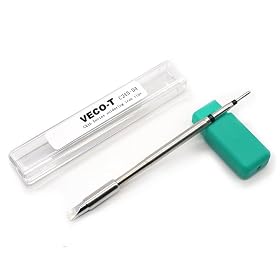
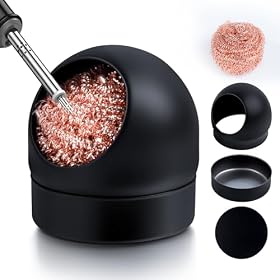
A soldering tip that will not stay tinned is usually oxidized, contaminated, overheated, or worn out. Follow these checks in order before replacing the tip or station.
A soldering tip that will not stay tinned is usually oxidized, contaminated, overheated, or simply worn out. Clean the tip, apply fresh solder immediately, check the temperature and solder type, and replace the tip if its plating is damaged. Do not file or sand a modern plated tip, because that can permanently remove its protective surface.
What “staying tinned” means
A properly tinned tip has a thin, shiny layer of solder on the working area. That coating helps transfer heat and protects the tip from oxidation. If solder beads up, disappears immediately, or leaves only dry gray patches, the tip is not staying tinned.
Fixes to try, in order
1. Clean and re-tin the tip
With the iron at the manufacturer’s recommended working temperature:
- Wipe the tip briefly on a damp soldering sponge or, preferably, brass wool.
- Feed fresh solder onto the cleaned working surface.
- If the solder wets the tip, leave a thin coating on it before returning the iron to its holder.
- Repeat once or twice if the tip is only lightly oxidized.
Do not leave the tip clean and bare while the iron is hot. Add a small amount of solder before pauses and again before switching the iron off.
A damp sponge should be moist, not dripping wet. Excessive wiping can rapidly cool the tip and remove useful solder coating. Brass wool generally removes residue with less thermal shock.
2. Use tip tinner for light oxidation
If fresh solder will not wet the tip, a small amount of purpose-made tip tinner can help remove light oxidation and restore solder coverage. Follow the product instructions, heat the tip as directed, and then coat it with ordinary solder.
Tip tinner is not a substitute for a badly damaged tip. If solder still beads up after several attempts, stop trying to revive it and inspect the plating.
3. Check for burned-on flux or contamination
Flux residue, burned plastic, adhesive, dirty component leads, and other contaminants can prevent solder from wetting the tip. Clean the tip using the method recommended by the iron manufacturer, then apply fresh solder.
Avoid household cleaners, abrasive pads, knives, and files. Also avoid acid-based plumbing flux on electronics. It can damage copper conductors, circuit boards, and tip surfaces. Use electronics-grade solder and flux instead.
4. Reduce excessive heat
A tip can oxidize quickly when it is left hot and uncovered, especially at an unnecessarily high setting. Set the station according to the solder and component manufacturer’s guidance rather than choosing the highest temperature available.
Lead-free solder commonly requires different settings than traditional tin-lead solder, but there is no single temperature that is correct for every alloy, tip size, board, and joint. If flux burns almost immediately or the tip turns dark soon after cleaning, excessive heat or long idle periods may be contributing to the problem.
Use a tip large enough to transfer heat efficiently. An extremely small tip may require more time on the joint, which can overheat both the work and the tip.
5. Check the solder and flux
Poor-quality, old, or contaminated solder may wet poorly. Confirm that the solder is intended for electronics and that its flux core is still usable. Solid solder without a suitable flux will not behave like flux-cored electronics solder.
For difficult surfaces, apply a small amount of electronics-grade flux to the joint—not an aggressive acid flux. Too much flux can also leave residue and increase cleanup requirements.
6. Confirm the tip is installed correctly
A loose or incorrectly installed tip may not transfer heat properly. Turn the iron off and let it cool completely, then check that:
- The tip is the correct type and size for the handpiece.
- The tip is fully seated as specified by the manufacturer.
- The retaining collar or screw is not loose.
- Oxidized debris is not preventing contact.
- The handpiece connector is fully inserted into the station.
Never tighten or remove a hot tip unless the manufacturer specifically provides a safe procedure for doing so.
7. Inspect the tip for plating damage
Replace the tip if the working surface has deep pits, cracks, exposed copper, severe black oxidation, or an irregular shape. A tip with damaged plating may briefly accept solder but will not retain a reliable coating.
Do not file, sand, scrape, or grind a plated soldering tip. These actions can expose the copper core, causing the tip to erode rapidly and possibly contaminating solder joints.
8. Check the station or iron last
If multiple known-good tips fail in the same way, the problem may be related to temperature control, heater performance, tip sensing, or poor electrical contact in the handpiece. Compare the behavior with the manufacturer’s operating guidance and inspect the cable and connectors for damage.
Disconnect power before examining electrical connections. Do not open or repair a station unless you are qualified to work safely on that equipment. A station that overheats, smells of burning insulation, produces smoke unrelated to flux, or has damaged wiring should be removed from service and evaluated by a qualified technician.
When to replace the tip
Replace the tip when it will not accept solder after cleaning and tip tinner, when the plating is visibly damaged, or when the tip shape has eroded enough to affect joint access. Choose a replacement that matches the handpiece and station system; tip shapes and mounting systems are not universally interchangeable.
If new, correctly fitted tips repeatedly fail, replacing the tip alone may not solve the problem. Investigate the station’s temperature control and handpiece connection before buying a large supply of replacement tips.
How to keep a tip tinned
- Keep a thin solder coating on the tip whenever it is hot.
- Use the manufacturer’s recommended temperature range.
- Avoid long idle periods at high heat.
- Use brass wool or a properly damp sponge rather than abrasive tools.
- Clean and re-tin before placing the iron in its stand.
- Use electronics-grade solder and flux.
- Keep the tip stored with a light solder coating when the iron is off.
- Replace worn tips instead of trying to reshape the plated surface.
A tip that suddenly stops taking solder may be recoverable with cleaning and tip tinner. A tip that has exposed copper or severe pitting is generally a replacement-part problem, while repeated failure across several tips points to an incorrect setup or a station fault.