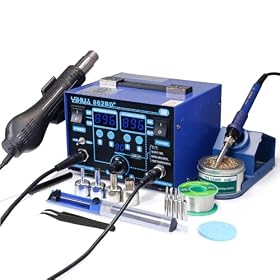
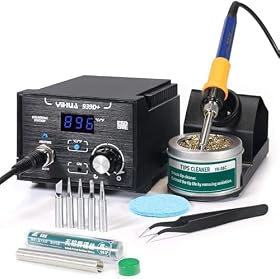
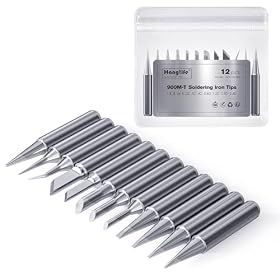
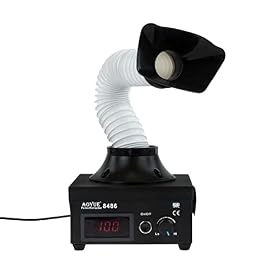
The best soldering station for an electronics hobbyist is usually a temperature-controlled, grounded station with readily available tips, a comfortable iron, and enough power for the work you actually do.
The best soldering station for electronics hobbyists is usually a temperature-controlled station with a comfortable iron, replaceable tips, stable temperature regulation, and enough power for your projects. You do not necessarily need the most powerful or expensive station; tip availability, heat recovery, ergonomics, and safe operation often matter more.
Quick recommendation
For general electronics repair, circuit boards, wiring, and kits, look for a station with:
Adjustable temperature control rather than a fixed-temperature iron
Enough power for quick heat recovery when soldering ground planes or larger joints
A grounded or ESD-safe design when working with sensitive electronics
A light, flexible handpiece and heat-resistant cable
Common replacement tips in several shapes and sizes
A stable stand and brass-wool or suitable tip-cleaning system
Sleep or standby features if you frequently pause between joints
Avoid choosing based only on the highest advertised wattage. A well-regulated station with a useful tip range can be easier to control than a more powerful unit with poor temperature stability or an awkward handpiece.
What to look for in a soldering station
Temperature control and regulation
A station should let you set the working temperature and maintain it as the tip contacts a joint. The displayed temperature is useful, but regulation and heat recovery are more important than having an unusually large temperature range.
For typical leaded electronics solder, many hobbyists work in a moderate temperature range. Lead-free solder commonly requires more heat and benefits from better heat recovery. Follow the solder manufacturer's recommendations, and use the lowest temperature that produces a clean joint without prolonged heating.
A simple dial can be perfectly adequate. Digital controls are convenient when you regularly switch between solder types, tip sizes, or materials, but a display alone does not guarantee better performance.
Power and heat recovery
Power affects how quickly the station reaches temperature and how well it recovers when the tip touches a joint that draws away heat. This matters when soldering:
Large ground areas on circuit boards
Thick wires and terminals
Connectors with substantial metal contacts
Lead-free joints
Multiple joints in quick succession
For small signal wiring and ordinary through-hole work, extreme power is usually unnecessary. For mixed hobby work, choose a station with enough reserve power that the tip does not cool dramatically on larger joints. Manufacturer specifications should be compared carefully because electrical input power and actual heater performance are not interchangeable measurements.
Tip availability and compatibility
Tips are consumables. Before buying a station, check whether replacement tips are easy to find and whether the available shapes match your work.
Useful shapes include:
Fine conical tips for small pads and precise work
Chisel tips for transferring heat to ordinary joints
Bevel tips for dragging solder and handling stranded wire
Larger tips for connectors, ground planes, and heat-heavy joints
A tip that is too fine often transfers less heat than a medium chisel or bevel tip. Use the largest tip that fits the joint without touching nearby pads. Also check whether the station uses a widely supported tip family or a proprietary design that may be harder to replace.
Handpiece comfort
A lighter iron with a flexible cable reduces hand fatigue and makes it easier to control the tip. Look for a grip that does not become uncomfortably hot and controls positioned so they cannot be changed accidentally during use.
The cable should be flexible enough not to pull the iron across the workbench. A heavy or stiff cable can make fine soldering more difficult, even when the station itself has good temperature control.
ESD protection and grounding
If you work on microcontrollers, computer boards, sensors, or other static-sensitive electronics, consider a station advertised as ESD-safe and follow the manufacturer's grounding instructions. ESD protection is part of a complete work setup; the station alone does not eliminate static risk.
Use an appropriate grounded workspace and handle sensitive components according to their documentation. If you are unsure whether your electrical setup is safe, consult the station manual or a qualified professional rather than modifying the grounding arrangement yourself.
Controls, presets, and sleep modes
Digital stations may offer temperature presets, password locks, calibration adjustments, automatic sleep, or automatic shutdown. These features can be useful, but they are not essential for every hobbyist.
Sleep modes help reduce tip oxidation and unnecessary heat while the iron is resting. A motion sensor or timed setting is convenient, but confirm that the behavior suits your workflow. Some projects require the iron to remain ready for repeated short operations; others benefit from aggressive idle protection.
Stand and tip cleaning
A secure iron stand is more important than it may appear. It should hold the hot iron without allowing the tip or cable to contact flammable materials. A brass-wool cleaner is commonly used because it removes residue without cooling the tip as sharply as a wet sponge, though either method must be used according to the station and tip manufacturer's guidance.
Keep solder, flux, and cleaning materials organized so the iron is returned to the stand whenever it is not in your hand. Do not leave a hot iron unattended.
Product prices and availability are accurate as of the date/time indicated and are subject to change. Any price and availability information displayed on Amazon.com at the time of purchase will apply to the purchase of this product.
Choosing a station by project type
For circuit kits and through-hole components
A basic temperature-controlled station with a medium chisel or bevel tip is usually the most practical choice. Prioritize easy controls, a comfortable handpiece, and affordable replacement tips.
For small surface-mount work
Choose a station with stable temperature control, a light handpiece, and fine as well as medium-size tips. Magnification, good lighting, flux, and tweezers may improve results more than upgrading to a much more powerful station.
For lead-free soldering
Look for good heat recovery and a tip system that supports several sizes. Lead-free solder can be less forgiving of an underpowered or poorly regulated iron. Do not compensate for poor heat transfer by setting the temperature excessively high; use a properly tinned tip and the correct tip size first.
For wires, connectors, and heavier joints
A station with greater heat reserve and larger compatible tips will be more useful. Check the manufacturer's guidance for the station's intended applications. A small precision iron may struggle with large connectors even if it reaches its displayed temperature quickly.
For occasional repairs or limited bench space
A compact station can be a better fit than a full-size bench unit. Confirm that it still has replaceable tips, a stable stand, and suitable electrical safety features. A portable iron can work for field repairs, but it is less convenient when you need continuous temperature control and a broad tip selection.
Product prices and availability are accurate as of the date/time indicated and are subject to change. Any price and availability information displayed on Amazon.com at the time of purchase will apply to the purchase of this product.
Soldering station versus soldering iron
A soldering station separates the controls and power electronics from the heated handpiece. This usually provides better adjustability, a more stable place to rest the iron, and easier access to replacement handpieces or tips.
A standalone soldering iron may be smaller and simpler. It can make sense for occasional, low-cost work or portable repairs, but many electronics hobbyists find a station easier to use at a bench. If you regularly solder circuit boards, the control and tip options of a station are generally worth prioritizing.
Product prices and availability are accurate as of the date/time indicated and are subject to change. Any price and availability information displayed on Amazon.com at the time of purchase will apply to the purchase of this product.
Accessories that affect results
The station is only one part of a workable electronics bench. Plan for:
Solder appropriate for the components and local regulations
Flux compatible with the solder and board
Tip cleaner and a safe iron stand
Side cutters and wire strippers
Ventilation or a fume extractor positioned to draw fumes away from your breathing zone
Magnification and task lighting for small joints
Helping hands or a board holder when the work must be held securely
A fume extractor does not replace general ventilation. Avoid directing fumes toward your face, and follow the safety information for the solder and flux you use.
Product prices and availability are accurate as of the date/time indicated and are subject to change. Any price and availability information displayed on Amazon.com at the time of purchase will apply to the purchase of this product.
How to get better results from any station
Select a tip that fits the joint instead of relying on an extremely fine tip for everything.
Keep the working portion of the tip tinned with a small amount of solder.
Heat the pad and component lead together, then feed solder into the heated joint.
Remove solder first, then remove the iron, unless the work requires a different technique.
Clean and re-tin the tip before returning the iron to its stand.
Do not scrape oxidation from plated tips with abrasive materials.
If a joint will not flow, check tip condition, flux, heat transfer, and contamination before simply increasing temperature.
When a more expensive station is worthwhile
Spend more when you need faster recovery on large joints, a broader and easier-to-find tip ecosystem, better handpiece ergonomics, ESD controls, or features such as presets and sleep modes. A more expensive station is less compelling if your work is limited to occasional small joints and the lower-cost option has reliable temperature control and available replacement tips.
The most important long-term purchase check is replacement support. Before ordering, verify that tips, handpieces, stands, and other wear parts are available for the exact station family. If replacement tips are difficult to locate, a low initial cost may not remain an advantage.
Safe operating practices
Keep the iron in its stand when not in use, protect the work surface from heat, and keep flammable materials away from the hot tip. Unplug the station before servicing it, and never open or modify mains-powered equipment unless you are qualified to do so. Follow the manufacturer's instructions for grounding, fuse replacement, calibration, and compatible accessories.
If the cord, plug, handpiece, heater, or temperature control behaves unpredictably, stop using the station. Replace the affected part only with a manufacturer-approved or otherwise verified compatible part. When the fault involves mains wiring or internal electrical components, use a qualified repair professional or replace the station.
FAQ
What temperature should an electronics soldering station use?
Use the solder manufacturer's guidance and the lowest temperature that produces a clean joint without prolonged heating. Lead-free solder often needs more heat than leaded solder, but excessive temperature can damage pads, components, and tips.
How much power should a soldering station have for hobby electronics?
Choose enough power for the largest joints you expect to make, because power reserve affects heat recovery. For small circuit-board work, extreme wattage is usually unnecessary; heavier wires, connectors, and large ground planes benefit from more heat reserve.
Is a digital soldering station better than an analog one?
Not automatically. Digital controls can make temperature presets and repeated settings convenient, while a well-regulated analog station can work very well. Tip quality, temperature regulation, handpiece comfort, and replacement-tip availability matter more than the type of display.
Do I need an ESD-safe soldering station?
It is a sensible feature when working with static-sensitive components such as microcontrollers, sensors, and computer boards. Follow the manufacturer's grounding instructions and use appropriate ESD practices for the entire workspace.
What soldering tip shape should a beginner buy?
A medium chisel or bevel tip is a useful general-purpose starting point because it transfers heat well to ordinary joints. Add a fine tip for small pads and a larger tip for wires or heat-heavy connections.