Temperature-controlled station for through-hole kits
A temperature-controlled soldering station makes through-hole kits easier to assemble by maintaining a more consistent tip temperature. Here is how to choose the right station without paying for features you may not need.
A temperature-controlled soldering station is usually the right choice for through-hole kits because it helps maintain a consistent tip temperature while you solder component leads, wires, and PCB pads. For most kits, prioritize stable temperature control, readily available replacement tips, comfortable handling, and enough power for larger joints—not maximum temperature or a long list of features.
What a through-hole kit requires
Through-hole assembly is generally forgiving, but the board still benefits from controlled heat. A suitable station should let you:
Heat a joint quickly without holding the tip on the pad for too long
Maintain temperature as the tip contacts a component lead and copper pad
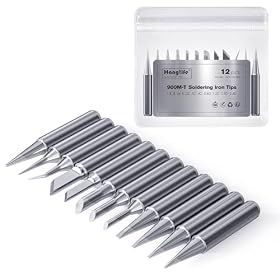
Use different tip shapes for small pads, wires, and larger terminals
Adjust the temperature for different solder types and heat-sensitive parts
Replace worn or oxidized tips without replacing the entire station
A basic temperature-controlled station is usually more useful than a high-powered fixed-temperature iron. It gives you control without requiring the advanced features often aimed at production work or specialized rework.
Features that matter most
Adjustable, regulated temperature
Look for a station with an adjustable setpoint and closed-loop temperature control. The station should sense tip temperature and provide additional power when the tip loses heat during a joint.
A temperature display is helpful, but the displayed number is not the same as the exact temperature at the solder joint. Tip size, airflow, contact with the work, solder type, and the condition of the tip all affect actual heat transfer. Follow the solder and kit manufacturer’s recommendations rather than assuming the display is perfectly calibrated.
For many common electronics jobs, a moderate setting is sufficient. Lead-free solder often needs more heat than traditional tin-lead solder, but increasing temperature is not always the best solution for slow soldering. A clean, properly tinned tip and the correct tip size usually improve results more than simply turning up the control.
Adequate power and recovery
Power affects how quickly the station can replace heat lost when the tip touches a joint. Through-hole kits with small component leads do not normally require an extreme-power station, but extra capacity is useful when soldering ground planes, heavy wires, switches, connectors, or large terminals.
Compare the station’s rated power and stated temperature recovery with your likely work. A station that recovers slowly can encourage you to hold the tip on a joint too long, increasing the risk of lifted pads or overheated components. The power rating alone does not guarantee performance, so also consider the station’s tip and heater design and the manufacturer’s documentation.
Tip availability and compatibility
Tip compatibility can matter more than the initial station price. Check whether replacement tips are easy to find and whether the station supports shapes suited to your work.
Useful shapes for through-hole kits commonly include:
Conical tips: Useful for small pads and precise work, although they transfer less heat if they are too narrow
Chisel tips: Good general-purpose choices because a flat edge transfers heat efficiently
Bevel or hoof tips: Helpful for dragging solder or carrying a small amount of molten solder
Larger chisel tips: Useful for ground connections, wires, and large through-hole terminals
Do not choose a very fine tip for every task. A tip should be narrow enough for access but large enough to transfer heat efficiently to both the pad and lead.
Comfortable handpiece and flexible cord
Kit assembly can involve many joints, so a light handpiece, flexible cable, and balanced grip reduce fatigue. Controls should be easy to adjust without accidentally changing the temperature while you work.
If the station has a separate holder, look for one that supports the iron securely and includes a brass-wool or damp sponge tip-cleaning area. A stable holder is a basic safety feature, not just a convenience.
ESD protection
An ESD-safe station can reduce the risk of static discharge damaging sensitive semiconductors. This matters more when a kit includes MOSFETs, microcontrollers, sensors, or other static-sensitive parts.
ESD protection is only effective when the complete setup is appropriate. Follow the manufacturer’s grounding instructions, and use an ESD mat or wrist strap when the project and work environment call for it. Do not assume that a station labeled ESD-safe makes an otherwise ungrounded workbench safe.
Sleep and automatic shutoff features
Sleep mode can lower the tip temperature after a period of inactivity, helping reduce oxidation and accidental heat damage. Automatic shutoff can provide an additional safeguard, but it should not replace unplugging the station when you finish or leave the workspace.
These features are useful if you frequently pause during kit assembly. They are less important than tip compatibility and temperature stability if you are choosing between otherwise similar stations.
Product prices and availability are accurate as of the date/time indicated and are subject to change. Any price and availability information displayed on Amazon.com at the time of purchase will apply to the purchase of this product.
Temperature and solder selection
Set the station according to the solder you are using and the kit instructions. Traditional tin-lead solder generally melts at a lower temperature than lead-free solder. Lead-free solder may require a higher setting and careful technique, but excessive heat can damage pads, insulation, and components.
Use the lowest setting that allows you to form a clean joint promptly. If solder will not flow, check the tip condition, flux, joint cleanliness, and contact between the tip and both parts of the joint before making a large temperature increase.
A clean joint should have solder that flows around the lead and pad rather than forming a loose blob. Avoid using the soldering iron to melt a large amount of solder on the tip and then transferring it to the board. Heat the joint first, then feed solder into the heated joint.
Product prices and availability are accurate as of the date/time indicated and are subject to change. Any price and availability information displayed on Amazon.com at the time of purchase will apply to the purchase of this product.
Which station level is appropriate?
Basic temperature-controlled station
A basic station is a good fit for occasional through-hole kits, educational projects, simple repairs, and hobby electronics. Look for adjustable temperature control, common replaceable tips, a secure stand, and a handpiece that feels comfortable.
You probably do not need multiple outputs, computer connectivity, advanced calibration controls, or a large accessory package for this type of work.
More capable single-channel station
A more capable station makes sense if you regularly build kits, solder large connectors, work with ground planes, or switch between delicate and heavy joints. Extra power and faster recovery can make the process more consistent, while a broader tip range gives you more control over different assemblies.
Consider this level if you expect to move beyond small through-hole kits into cable work, repairs, or general electronics assembly.
Station with interchangeable handpieces or multiple tools
A station that supports hot tweezers, hot air, or multiple soldering handpieces can be useful for varied repair work. For through-hole kits alone, however, these features add cost and workspace requirements without necessarily improving basic assembly.
Choose this type only if you already know you need those tools. A well-matched single soldering handpiece is usually simpler for kit building.
Product prices and availability are accurate as of the date/time indicated and are subject to change. Any price and availability information displayed on Amazon.com at the time of purchase will apply to the purchase of this product.
Accessories worth buying with the station
A station is easier to use when paired with a few practical accessories:
Replacement tips in at least one general-purpose and one larger size
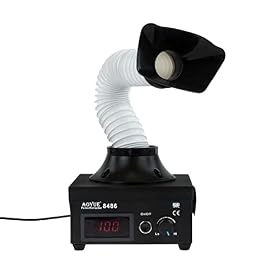
Fume extraction is especially important when soldering for extended periods. Avoid directing smoke toward your face, and follow the safety guidance for the solder, flux, and workspace.
Product prices and availability are accurate as of the date/time indicated and are subject to change. Any price and availability information displayed on Amazon.com at the time of purchase will apply to the purchase of this product.
Buying checklist
Before choosing a temperature-controlled station for a through-hole kit, check:
Temperature control: Is the setpoint adjustable and regulated rather than merely fixed?
Power and recovery: Can it handle the kit’s largest pads, wires, and terminals without excessive heating time?
Tip system: Are compatible replacement tips available in useful shapes and sizes?
Handpiece comfort: Is the grip balanced, and is the cord flexible enough for bench work?
Stand and safety: Does it include a stable holder and clear operating instructions?
ESD requirements: Does the station and your planned setup provide the protection your components need?
Replacement parts: Can you obtain tips, heaters, or other service parts if needed?
Controls: Are the display and temperature controls easy to read and adjust?
Common problems with a new station
Solder does not flow
Clean and tin the tip, then touch the tip to both the pad and component lead. Confirm that you are using the correct solder and that the temperature follows the solder manufacturer’s guidance. Oxidized component leads, contaminated pads, or insufficient flux can also prevent proper wetting.
The tip cools noticeably during a joint
The tip may be too small for the joint, or the station may not have enough recovery capacity for large copper areas. Try an appropriately larger tip before increasing temperature. If the problem continues across normal work, the station may be undersized or the heater and tip may need replacement.
Pads lift from the board
Excessive heat, prolonged contact, mechanical force, or repeated rework can damage pads. Use a clean tip, improve heat transfer, and remove solder without pulling on the component. If a pad has already detached, stop and repair the board according to the kit or PCB manufacturer’s guidance.
The station temperature seems inaccurate
Check that the tip is installed correctly, fully seated, clean, and compatible with the handpiece. Displays can differ from the actual temperature at the working surface. If the station remains inconsistent after replacing the tip and following the manufacturer’s calibration procedure, contact the manufacturer rather than opening a mains-powered station yourself.
When to choose a different tool
A temperature-controlled station is the sensible default for through-hole kits, but it is not the only tool you may eventually need. A simple iron may be adequate for very occasional repairs, while hot air or specialized rework tools are better suited to many surface-mount tasks.
If the station cannot maintain heat, has a damaged cord, shows signs of electrical failure, or repeatedly overheats, discontinue use. Replace the affected part only when the manufacturer specifies a compatible service part; otherwise, replacing the station is often safer than attempting an internal electrical repair. Unplug the station before cleaning or changing parts, and defer mains-voltage repairs to a qualified professional.
FAQ
Do I need a temperature-controlled station for through-hole kits?
You can assemble simple kits with a basic iron, but a temperature-controlled station is easier to control and more versatile. It helps maintain heat when working with different pad sizes, component leads, wires, and solder types.
What temperature should I use for a through-hole kit?
Use the solder and kit manufacturer’s guidance as the starting point. Lead-free solder generally needs more heat than tin-lead solder. Choose the lowest setting that allows the solder to flow quickly on a properly cleaned and fluxed joint.
How much power does a soldering station need for through-hole work?
Small component leads usually do not require an unusually powerful station. More power and faster recovery become useful for ground planes, large terminals, connectors, and heavy wires. Consider recovery behavior and tip size along with the stated power rating.
Is an ESD-safe soldering station necessary?
It is especially useful when a kit contains static-sensitive semiconductors. However, the station must be used according to its grounding instructions, and other ESD controls may be needed at the workbench.
Which soldering tip is best for through-hole kits?
A medium chisel or bevel-style tip is often a practical general-purpose choice because it transfers heat efficiently. Keep a smaller tip for restricted access and a larger tip for wires, ground connections, and other heat-demanding joints.