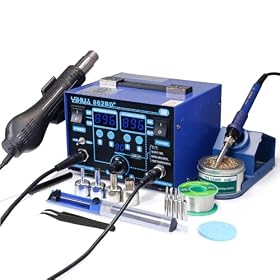
The best soldering station for game console repair should provide stable temperature control, interchangeable fine tips, enough power for ground planes, and a comfortable handpiece. Here is how to choose one for HDMI ports, USB connectors, capacitors, and board-level repairs.
Best station for repairing game consoles
The best station for repairing game consoles is one with stable temperature control, a selection of fine and chisel tips, enough power to recover heat on large ground planes, and an ergonomic handpiece. You do not necessarily need the most expensive station, but a basic hobby iron can make delicate console work slower and riskier.
For most repairs, prioritize temperature stability, tip availability, heat recovery, ESD precautions, and replacement-part support over a large temperature display or maximum advertised temperature.
What matters most in a console-repair soldering station
Stable temperature control
Console circuit boards contain small pads, narrow traces, plastic connectors, and heat-sensitive components. A station that holds its selected temperature reasonably consistently makes it easier to avoid overheating a pad while still melting solder cleanly.
Temperature adjustment should be quick and easy to read. Presets can also be useful when switching between tasks, such as:
Removing or replacing capacitors
Resoldering controller or power connectors
Repairing USB or HDMI ports
Touching up cracked solder joints
Working with lead-free factory solder
The displayed temperature is not the same as the temperature at the joint. Tip size, contact time, airflow, oxidation, solder type, and the board's thermal mass all affect the result. Follow the station and solder manufacturer's guidance rather than treating one temperature setting as universal.
Sufficient power and heat recovery
Wattage is not a direct measure of soldering quality, but it affects how quickly a station can restore tip temperature when the tip contacts a large copper area. Console boards often have ground planes that draw heat away from the joint.
A station with good heat recovery is especially useful for:
HDMI and USB connector ground tabs
Shielding tabs
Large connector pins
Grounded capacitor pads
Multi-layer boards
More power does not mean you should use excessive temperature. A lower setting with a properly sized tip and good heat transfer can be safer than a very high setting with a tiny tip.
Interchangeable tips
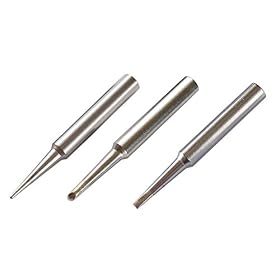
Tip selection often has more practical impact than the station's maximum temperature. A useful starter set for console repair includes:
A fine conical or needle tip for small signal pins
A wider chisel tip for connector tabs and ground areas
A bevel tip for transferring solder and heat to stubborn joints
Very pointed tips are not always best for precision work. They hold little solder and transfer heat through a small contact area. A small chisel or bevel tip can provide better control on connector pins without requiring excessive heat.
Check the cost and availability of replacement tips before buying a station. A station with inexpensive, easy-to-find tips may be more practical than one with a lower initial cost but limited consumables.
ESD and grounding considerations
Electrostatic discharge can damage sensitive electronics, so look for a station designed with ESD protection or a grounded, ESD-safe handpiece. This is only one part of an ESD-safe setup. Your work surface, wrist strap, mat, power arrangement, and handling practices also matter.
Use the manufacturer's instructions for connecting any grounding equipment. Do not create improvised connections to mains electrical ground or modify the station's wiring. If you are unsure whether your setup is safe, ask a qualified technician or electrician.
Comfortable handpiece and flexible cord
Console repairs can involve long periods of inspecting small pads and pins. A bulky handpiece or stiff cord can cause fatigue and make it harder to keep the tip steady.
Look for:
A lightweight handpiece
A flexible, heat-resistant cord
A grip that stays cool during normal use
A secure stand that keeps the hot tip away from the work surface
Easy tip changes without touching hot parts
A stable stand and brass wool or the cleaning method specified by the manufacturer are also important. Avoid treating a wet sponge as the only tip-maintenance method; repeated thermal shock can shorten tip life.
Which station type fits your repair work?
Basic temperature-controlled station
This is usually enough for occasional repairs such as replacing capacitors, repairing wires, or touching up accessible solder joints. It can be a good choice when you are learning and do not regularly work on large connectors.
Choose one with replaceable tips, ESD precautions, and a handpiece that is comfortable to hold. Avoid choosing solely by the number on the temperature display.
Higher-power soldering station
A higher-power station is more useful for connector replacement and boards with large ground areas. It can recover heat more effectively, reducing the temptation to press harder or hold the tip on the pad too long.
It still requires appropriate technique. Use flux, preheat only when appropriate, and select a tip with enough surface area to transfer heat efficiently.
Soldering and hot-air combination station
A combination unit may be useful if you also repair surface-mount components, shielding, or components with multiple leads. Hot air is not a substitute for a good soldering iron, however.
Hot air can move nearby components, soften plastics, spread solder balls, or damage connectors if used incorrectly. For console repair, a dedicated iron is often the more important first purchase. Add hot air when your repair workload justifies learning its airflow, nozzle, temperature, and shielding requirements.
Product prices and availability are accurate as of the date/time indicated and are subject to change. Any price and availability information displayed on Amazon.com at the time of purchase will apply to the purchase of this product.
Recommended setup for common console repairs
HDMI and USB connector work
Use a station with good heat recovery and a small-to-medium chisel or bevel tip. These connectors may combine fine signal pins with large ground tabs, so one very fine tip is inconvenient.
Flux can improve wetting and reduce the amount of time heat must remain on the joint. Use magnification, inspect every pin, and check for solder bridges before powering the board.
Capacitor replacement
A moderate-size chisel tip generally transfers heat more effectively than a needle tip. Add fresh solder or flux only as appropriate for the joint, and avoid prolonged heating that can lift pads.
Observe polarity markings and compare the replacement component's specifications with the original or the repair documentation. A soldering station cannot compensate for an incorrect replacement part.
Small surface-mount components
Fine tips, magnification, controlled flux application, and a stable handpiece are more important than simply increasing temperature. Tweezers and hot air may be useful for some components, but they also increase the chance of moving nearby parts.
Work slowly and inspect under magnification after cleaning the board.
Product prices and availability are accurate as of the date/time indicated and are subject to change. Any price and availability information displayed on Amazon.com at the time of purchase will apply to the purchase of this product.
Features that are easy to overvalue
Extremely high maximum temperature
Most routine console repairs do not require the highest setting a station can display. Excessive heat increases the risk of lifted pads, damaged connectors, burned flux, and overheated components.
A large digital display
A clear display is convenient, but accuracy, stability, tip compatibility, and handpiece comfort matter more.
A large included tip assortment
A large kit is useful only if the tips fit the station, are durable, and include shapes you will actually use. Confirm the tip system before buying additional accessories.
Automatic sleep or standby modes
Sleep modes can reduce tip oxidation and improve safety, but they should not be the deciding factor if the station has poor tip availability or an uncomfortable handpiece. Make sure the feature can be adjusted or disabled when your repair workflow requires it.
Product prices and availability are accurate as of the date/time indicated and are subject to change. Any price and availability information displayed on Amazon.com at the time of purchase will apply to the purchase of this product.
A practical buying checklist
Before choosing a station, verify:
It has adjustable, temperature-controlled output.
Replacement tips are available in useful console-repair shapes.
The station provides the ESD precautions specified by its manufacturer.
The handpiece and cord feel manageable for detailed work.
The station has enough power and heat recovery for connector and ground-plane work.
The stand is stable and keeps the hot tip safely contained.
The controls are easy to adjust while wearing appropriate eye protection.
The seller or manufacturer provides clear operating and safety instructions.
For a first setup, budget for quality solder, flux, tip cleaner or brass wool, magnification, tweezers, and fume extraction—not just the station itself. Good consumables and visibility often improve results more than moving to a more expensive station.
Product prices and availability are accurate as of the date/time indicated and are subject to change. Any price and availability information displayed on Amazon.com at the time of purchase will apply to the purchase of this product.
Safe operating practices
Wear eye protection, keep flammable materials away from the iron, and use ventilation or fume extraction. Soldering fumes should not be intentionally inhaled. Wash your hands after handling solder, flux, or contaminated boards, especially before eating.
Unplug the console and verify that capacitors and other stored-energy components are safely discharged before working on the board. Console power supplies can contain hazardous voltages even after the unit is disconnected. Do not open or service mains-side power-supply sections unless you are trained and equipped to do so.
Allow the station to cool in its stand, and replace damaged cords, loose handpieces, or unstable stands rather than continuing to use them.
Bottom line
For most game-console repair work, choose a temperature-controlled station with strong heat recovery, ESD-safe design, readily available tips, and a comfortable handpiece. A fine chisel tip is usually more versatile than a single needle tip, while a wider tip helps with connector ground tabs and large pads.
If your work is limited to occasional repairs, a reliable basic station is sufficient. If you regularly replace HDMI or USB connectors, prioritize heat recovery and tip selection. If you also handle difficult surface-mount work, consider adding a properly controlled hot-air tool rather than expecting one iron to do everything.
FAQ
What temperature should I use for repairing game consoles?
There is no single correct setting. The appropriate temperature depends on the solder alloy, tip size, board mass, flux, and joint. Start with the solder and station manufacturer's guidance, use enough heat to complete the joint quickly, and avoid relying on excessive temperature to compensate for a poorly sized or oxidized tip.
Is a fine-point tip best for console repair?
Not always. A fine point can reach small pins, but a small chisel or bevel tip often transfers heat more effectively and holds a small amount of solder for drag soldering. Connector ground tabs may require a wider tip.
Do I need a hot-air station to repair game consoles?
No. A good soldering iron is the main tool for many connector, capacitor, wire, and solder-joint repairs. Hot air becomes useful for certain surface-mount and multi-lead components, but it requires separate technique and can damage nearby parts if misused.
Why does solder not melt when I touch the joint?
Check the tip condition, tip temperature, solder type, and contact area first. Clean and properly tin the tip, use a suitable tip size, add a small amount of fresh solder or flux when appropriate, and allow heat to reach both the pad and the component lead. Do not keep increasing temperature indefinitely, because prolonged heating can damage the board.
When should I replace my soldering station instead of repairing it?
Replacement is reasonable when the station has unstable output, damaged insulation, a loose or overheating handpiece, unavailable replacement tips, or a failed control unit that costs nearly as much to repair as a suitable replacement. Stop using equipment with damaged cords or unsafe grounding until it has been assessed.