Leaving a soldering tip dry at 400°C can burn away its protective solder coating and create heavy oxidation. Try cleaning and re-tinning it while hot, but replace the tip if solder still beads up or will not wet the working surface.
A soldering tip left dry at 400°C can oxidize very quickly. The surface loses its protective layer of molten solder, turns dark, and may stop accepting solder. Turn the iron down, add fresh solder, and try to re-tin the tip before assuming it is ruined. If solder continues to bead up or the working surface has pits, gaps, or exposed core metal, the tip is usually ready for replacement.
Why a dry tip oxidizes at 400°C
Solder on the tip is not only used to transfer heat. A thin coating of molten solder also shields the plated copper surface from air. When the tip is left hot without solder, the exposed surface oxidizes.
At 400°C, oxidation happens especially quickly because the temperature is well above the melting point of common electronics solder. Repeatedly heating a dry tip can:
Make solder bead up instead of spreading across the tip
Prevent the tip from wetting the pad or component lead
Cause poor heat transfer
Create dark, rough, or crusty surface deposits
Damage the plating if the tip is repeatedly overheated or scraped
A dark color alone does not always mean the tip is beyond recovery. The important test is whether fresh solder will wet the usable working surface.
How to try saving the tip
1. Lower the temperature
Reduce the station to the lowest temperature that can melt your solder and heat the joint effectively. For many electronics jobs, a setting around 300–350°C may be more appropriate than 400°C, but follow the solder, tip, and station manufacturer's guidance.
Do not leave the iron at high temperature while attempting recovery. Excessive heat accelerates oxidation and can damage the tip plating.
2. Add fresh solder directly to the tip
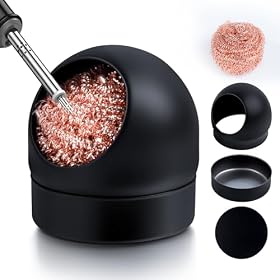
Feed fresh solder onto the heated working surface. Use enough to cover the tip rather than touching only a tiny spot. If the solder melts and spreads, keep the tip coated while wiping away residue with brass wool or a damp sponge approved for soldering-tip cleaning.
Repeat the process several times. The goal is to dissolve loose oxidation and rebuild a continuous solder coating.
3. Use brass wool or a suitable tip cleaner
Gently wipe the tip in brass wool to remove loose residue, then immediately apply fresh solder. A lightly damp cellulose sponge can also be used, but frequent thermal shock from a wet sponge may shorten tip life.
Avoid aggressive filing, sanding, knives, or abrasive materials. Most modern tips have a thin plated working surface. Removing that plating exposes the copper core and usually makes the tip unusable.
4. Use tip activator only when appropriate
If ordinary solder will not wet the surface, a tip tinner or tip activator may help with moderate oxidation. Apply it according to the product instructions, then coat the tip with solder.
Tip activator is not a cure for missing or damaged plating. If the surface is deeply pitted, swollen, cracked, or irregular after cleaning, replacement is the better option.
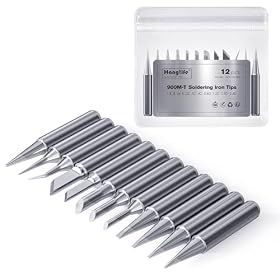
Replacement tips for a compatible soldering iron or station
Product prices and availability are accurate as of the date/time indicated and are subject to change. Any price and availability information displayed on Amazon.com at the time of purchase will apply to the purchase of this product.
Signs the tip is permanently damaged
Replace the tip when one or more of these conditions remain after cleaning and re-tinning:
Solder forms a ball and rolls off repeatedly
Only a small portion of the tip accepts solder
The working surface is deeply pitted or rough
Copper-colored metal is visible through the plating
The tip shape has eroded or no longer matches the intended geometry
The tip transfers heat poorly even when properly tinned
Do not try to restore a plated tip by filing it flat. That can remove the protective iron plating and expose the copper underneath. A replacement tip must match the soldering station or iron's heater system, dimensions, and tip series.
Product prices and availability are accurate as of the date/time indicated and are subject to change. Any price and availability information displayed on Amazon.com at the time of purchase will apply to the purchase of this product.
How to prevent the problem next time
Keep the tip tinned during idle periods
Before placing the iron in its stand, cover the working surface with a small amount of solder. The solder coating protects the tip from air while it remains hot.
Do not leave a large blob on the tip for long periods. A thin, complete coating is generally more useful than an oversized mass of solder.
Use the station's sleep or standby function
If the station has an adjustable sleep mode, set it to reduce temperature during pauses. A shorter idle interval lowers oxidation and reduces unnecessary thermal stress.
For longer breaks, place the iron in its holder and follow the station manufacturer's shutdown guidance rather than leaving it at 400°C.
Use the lowest effective temperature
Higher temperature does not automatically mean faster soldering. It can increase oxidation, burn flux more quickly, damage pads, and stress components. Choose a temperature that melts the solder and completes the joint efficiently without keeping the iron on the work for longer than necessary.
Lead-free solder often needs more heat than leaded solder, but the correct setting depends on the solder alloy, tip size, joint mass, and station. Follow the solder manufacturer's recommendations where available.
Keep the tip clean and wet
Clean the tip when residue builds up, then immediately re-tin it. Avoid leaving flux residue or burned material on the tip for extended periods.
Use compatible tip cleaner and solder. Some aggressive chemicals or unsuitable cleaning methods can damage tip surfaces.
Product prices and availability are accurate as of the date/time indicated and are subject to change. Any price and availability information displayed on Amazon.com at the time of purchase will apply to the purchase of this product.
If a new tip also fails to wet
If a replacement tip oxidizes or refuses solder almost immediately, check the setup rather than repeatedly applying more heat.
Confirm compatibility. Make sure the tip fits the iron and belongs to the correct tip family. A loose or incompatible tip may not transfer heat correctly.
Check the temperature reading. A station that runs much hotter than its display indicates can destroy tips quickly. Stop using it if you suspect a control or sensor fault.
Check the solder. Old, contaminated, or unsuitable solder may wet poorly. Electronics solder with an appropriate flux core is normally required for circuit work.
Check the cleaning method. Do not use files or harsh abrasives on plated tips.
Inspect the station and handpiece. If multiple tips fail under normal settings, the heater, sensor, control circuit, or handpiece connection may need service.
Disconnect equipment before inspecting electrical connections, and do not open a mains-powered station unless you are qualified to do so. Follow the manufacturer’s service instructions or use a qualified repair professional.
Bottom line
Try lowering the temperature, cleaning gently, and flooding the hot tip with fresh solder. A tip left dry at 400°C may recover if the oxidation is superficial. If solder still will not wet the surface or the plating is visibly damaged, replace the tip with a compatible one. The most effective prevention is simple: use the lowest effective temperature and keep the tip lightly tinned whenever it is hot.
FAQ
Can a soldering tip recover after being left dry at 400°C?
Sometimes. Lower the temperature, clean the tip gently with brass wool or an approved sponge, and apply fresh solder repeatedly. Recovery is unlikely if the plating is pitted, missing, or will not accept solder after several attempts.
Should I file a badly oxidized soldering tip?
No. Filing can remove the tip's protective plating and expose the copper core. Replace the tip if approved cleaning and tip activator do not restore solder wetting.
What temperature should I use instead of 400°C?
Use the lowest temperature that melts your solder and completes the joint effectively. Many electronics applications use roughly 300–350°C, but the suitable setting depends on the solder alloy, tip size, joint, and manufacturer's guidance.
Why does solder ball up on my soldering tip?
The tip may be oxidized, poorly tinned, contaminated, too cold, or incompatible with the iron. Try fresh electronics solder, gentle cleaning, and re-tinning. If the problem persists on a new compatible tip, inspect the station's temperature control.